After a Tennis, Padel, Beach Tennis or Badminton match is completed or retired, both players can stand together and share that match by QR. Nothing is sent while the match is still being played. The code belongs to the match on screen. See how match sharing works.
From that match
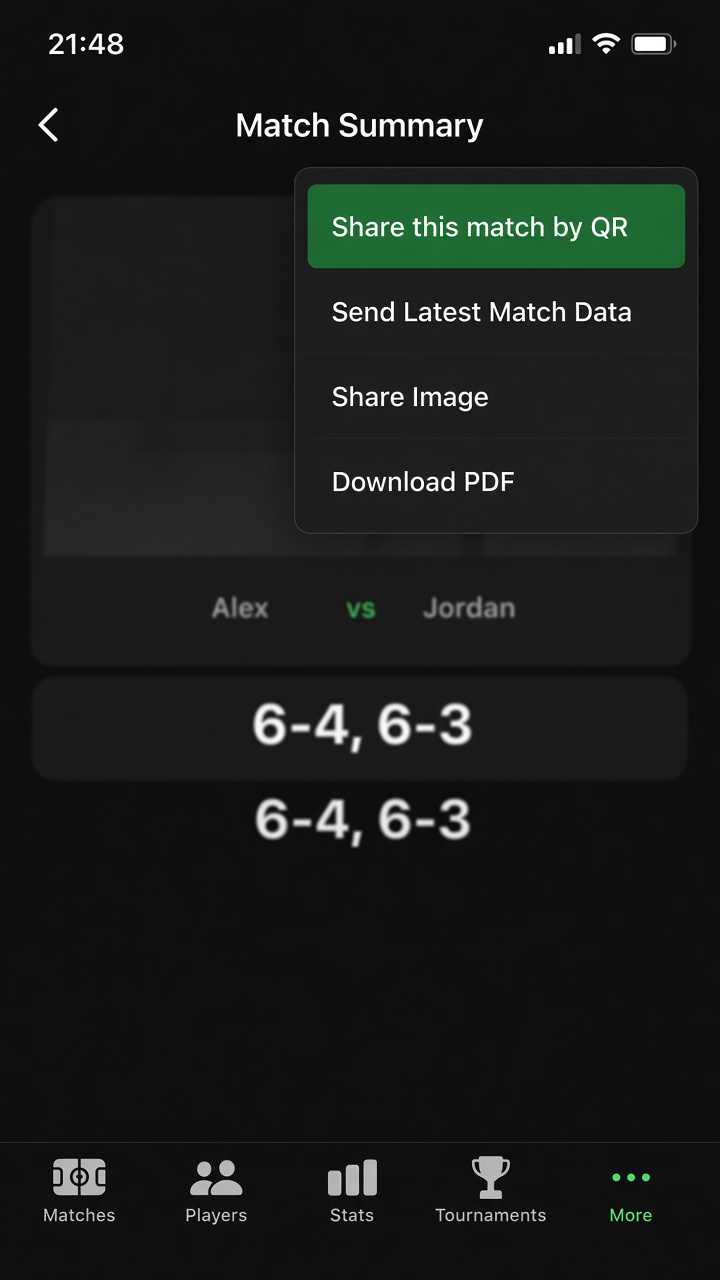
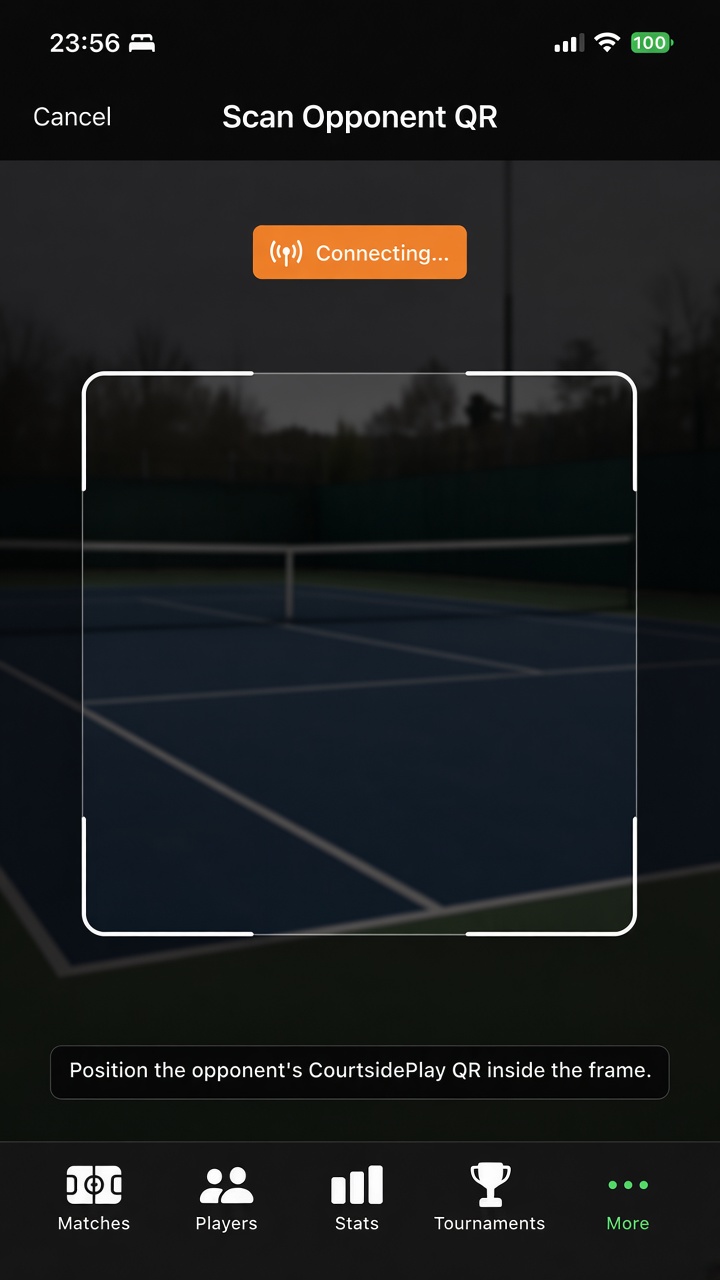
Share this match by QR. Open the finished match summary, tap Share, and choose Share this match by QR. Scanning happens on that same screen.
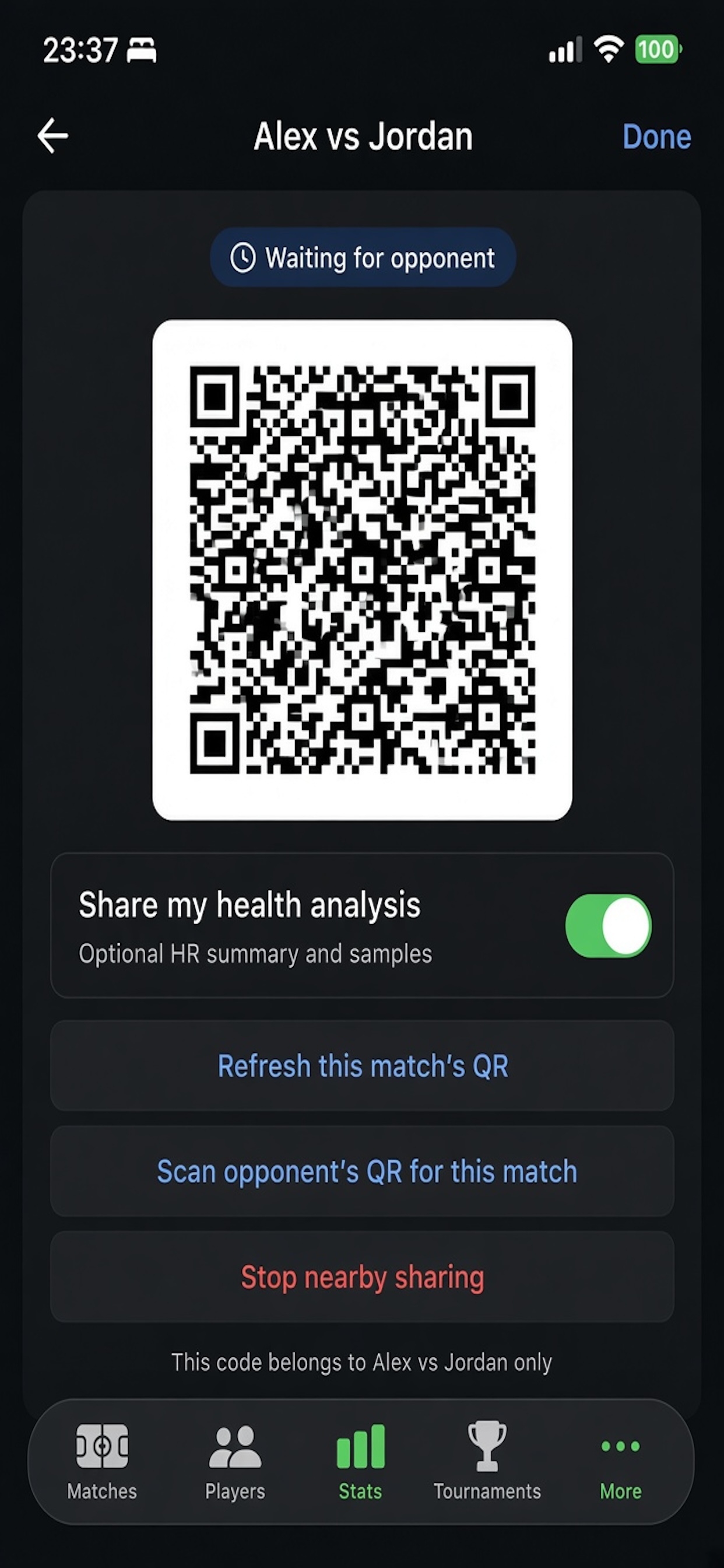
This match only. The Matches list has no scanner, and the code is not attached to a different match.
Nearby. The QR is a pairing code for 10 minutes. Use Refresh this match's QR if it expires. The points travel after the phones connect. The link is encrypted and stays between the two phones. CourtsidePlay does not upload the match.
Same scoring setup. Both phones need a finished match with the same sport and scoring. If the setup does not match, the scan is refused.
Share this matchWaiting
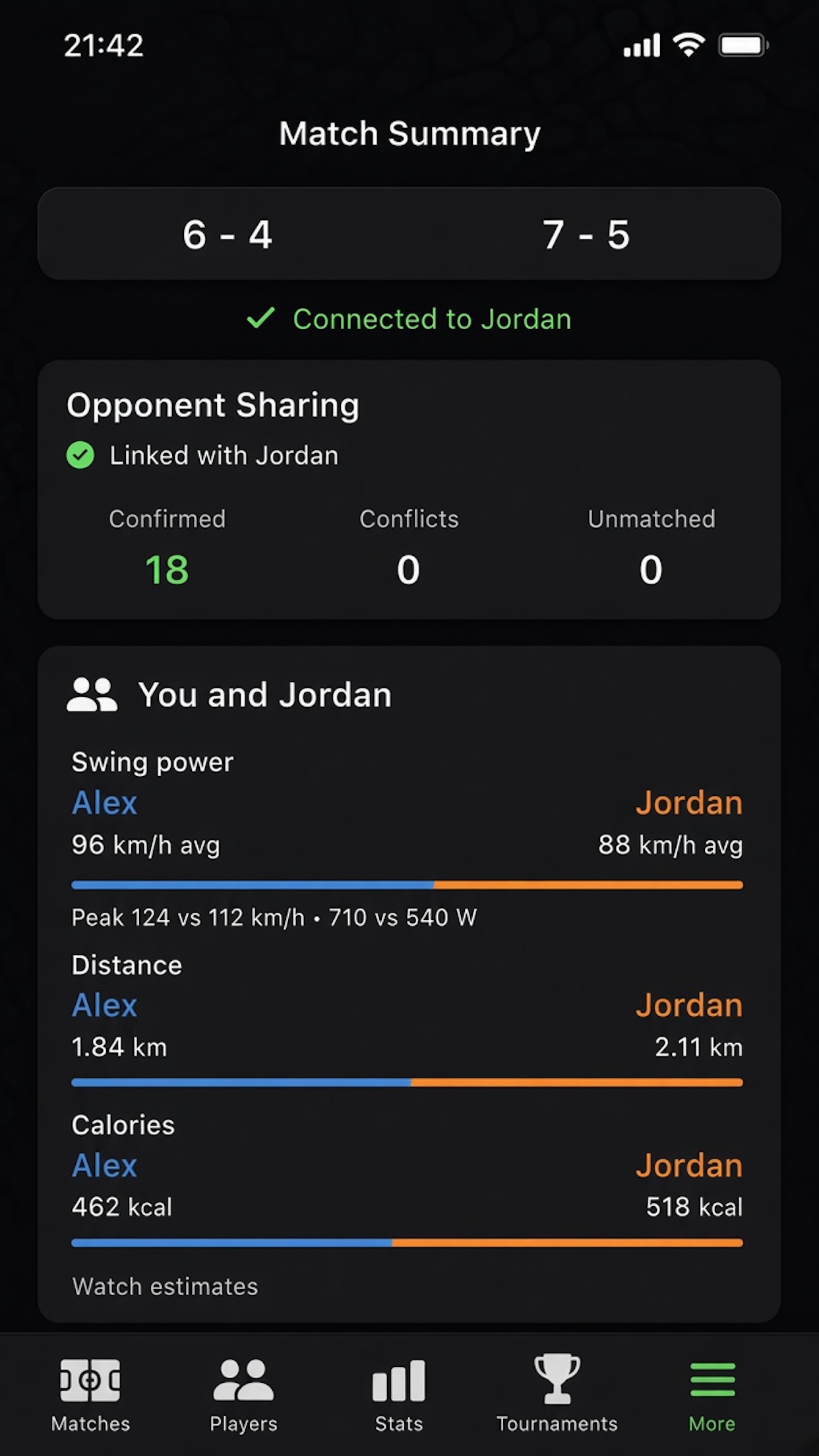
ConnectingCompared
What you compare
Effort. Overview shows swing power (average and peak racquet speed, plus estimated watts), distance and calories. Distance and calories appear when health sharing is on. Your swing power uses the height and weight saved on your player. The opponent's racquet speed uses a standard 175 cm and 70 kg body, because height and weight are not shared.
Points. The summary shows points both phones recorded the same way, conflicts, and points only one phone has.
Shots and heart rate. Opponent shots appear on the Shots pane. Heart rate appears when that player includes health. Received health data is not written to Apple Health.
This is separate from Watch to iPhone sync, which moves your own match between your watch and your phone.
Version 5.6.5 — Match Form, Shot Counts & Physical Growth
Released September 23, 2026
A player profile now shows how you win points, a match summary counts every shot type, and you can log height, weight and optional court tests over time. Dominant hand is required so forehand and backhand are read from the racquet wrist. Shot calibration on Apple Watch counts one swing as one rep, including a shadow swing with no ball.
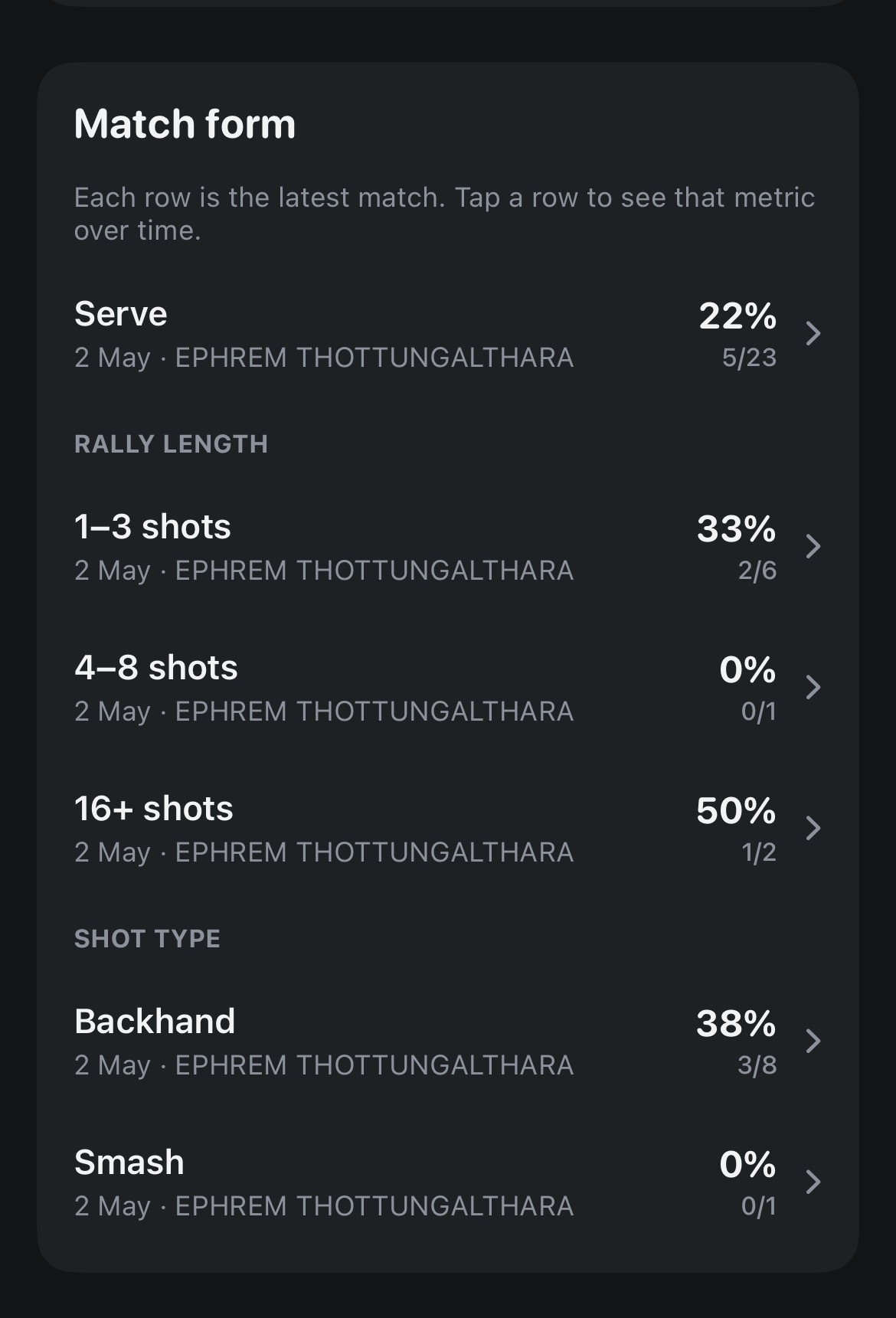
Match form
Latest match on the profile. Match form lists Serve, rally length (1–3, 4–8, 9–15 and 16+ shots) and each shot type from the most recent match that has that data.
Tap a row for history. Each row is points won. Open it to see that metric over time. A line is drawn once the same metric has been recorded in two matches.
Tagged on the phone score sheet. With the point, you can mark the shot and the rally length. Tennis and padel can also mark a first-serve fault. Those tags are what Match form reads.
Match formShot type breakdown
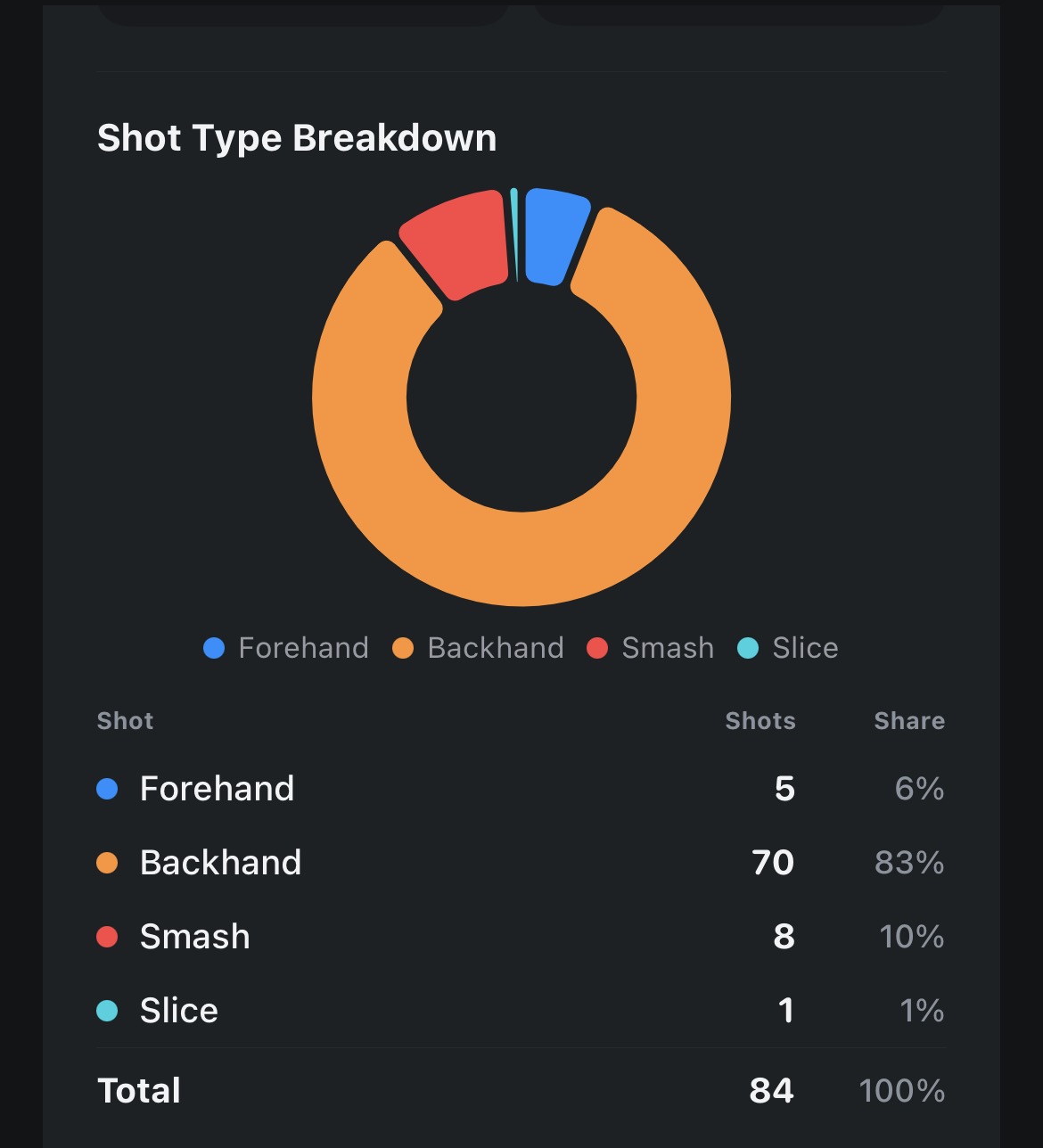
Shot counts
Shots pane. A ring and a table show how many of each shot you hit, and that type’s share of the match — forehand, backhand, smash, slice and the other types recorded on the point.
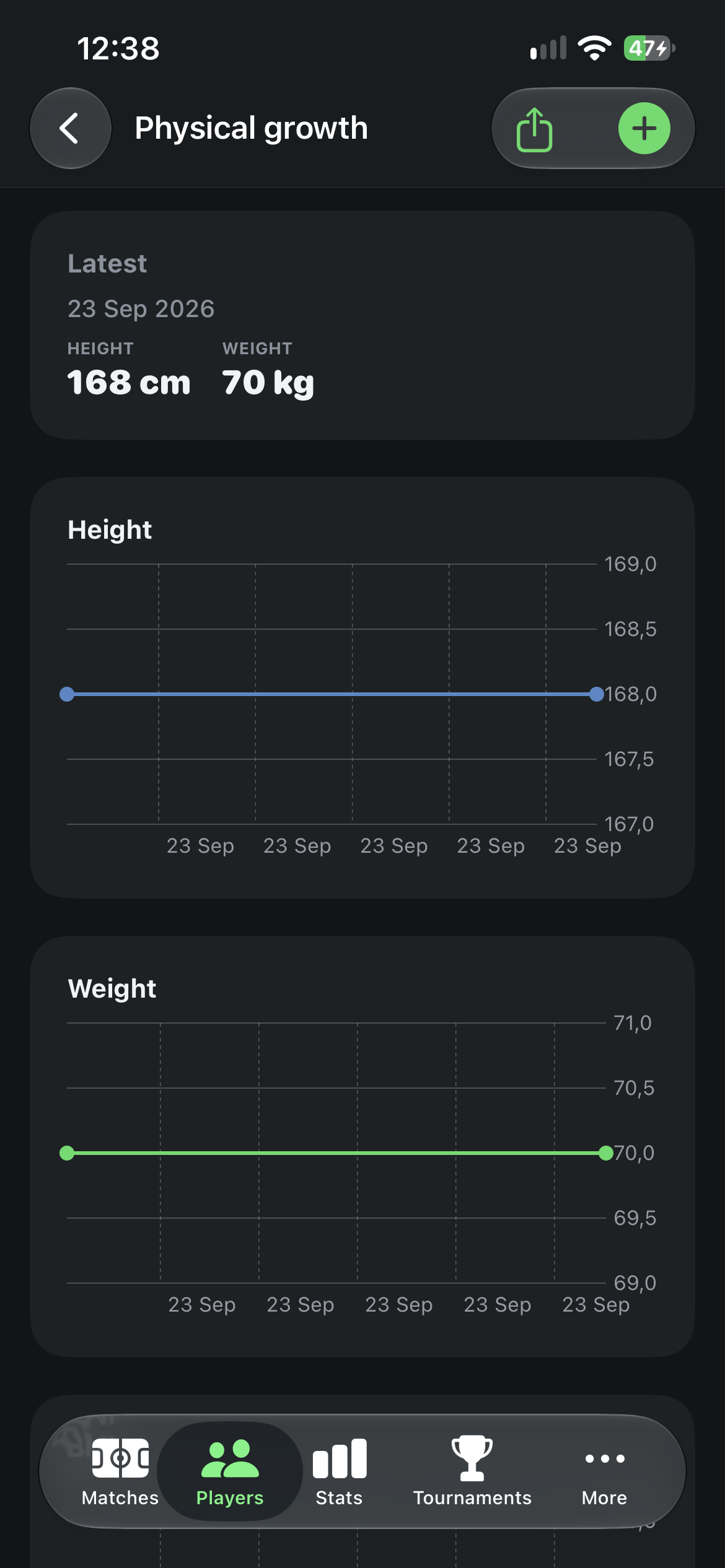
Physical growth
Dated check-ins. Under the player, save height and weight on a date. The next check-in is what the height and weight charts compare against. Export the log from the share button.
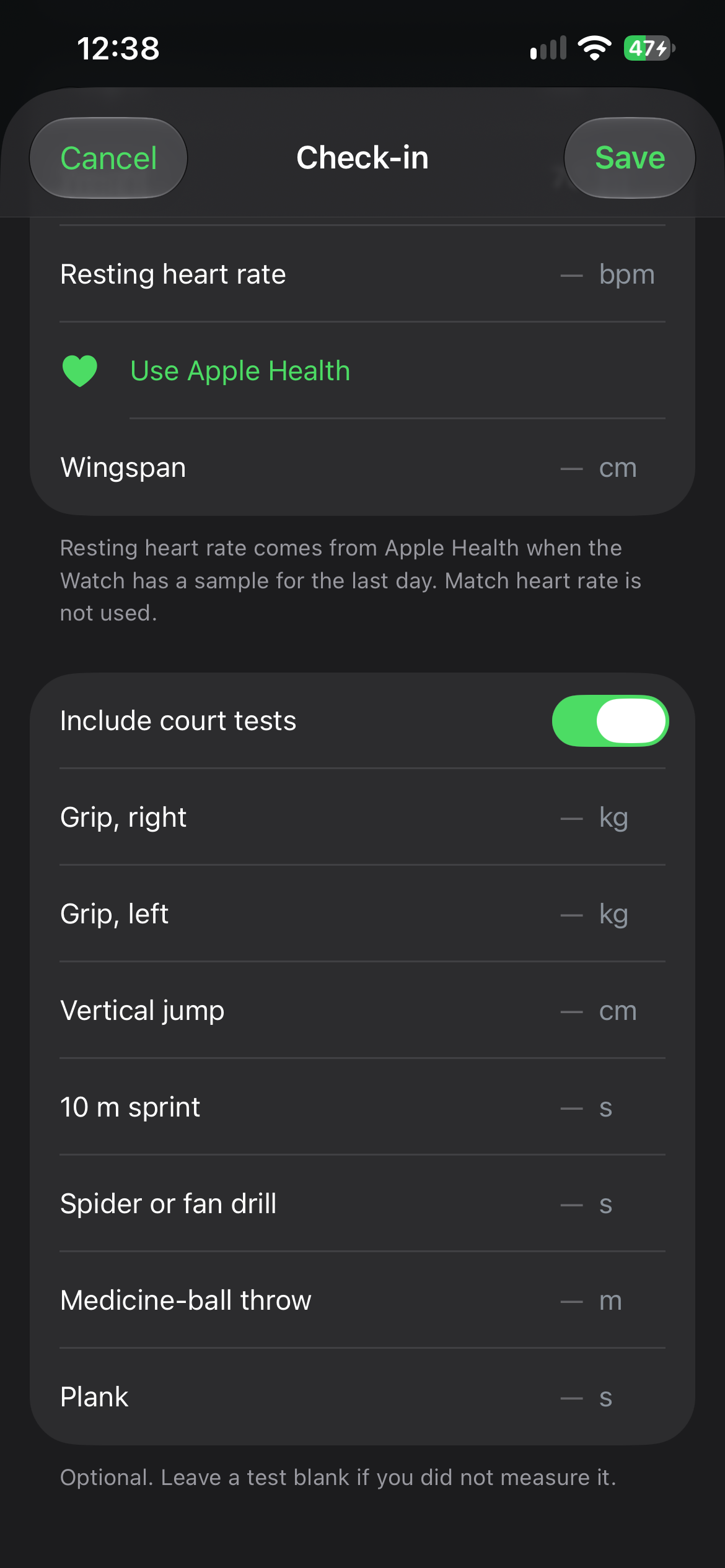
Optional court tests. A check-in can use resting heart rate from Apple Health, plus wingspan, grip, vertical jump, 10 m sprint, spider or fan drill, medicine-ball throw and plank. Leave a test blank if you did not measure it. This is a training log, not a medical assessment. Match heart rate is not used for the resting value.
Height and weightCheck-in
Also in this update
Heart rate vs your matches. After 30 minutes, low, average and max heart rate are compared with your usual matches. The comparison is on the match summary and in the match sheet.
ATP swing speed. A tennis match can be compared with ATP Top 100 swing speed.
One calibration rep per swing. On Apple Watch, a practice stroke — including a shadow swing with no ball — is stored once.
Eva on this website. A chat button at the bottom right, named Eva, answers questions about the site and links to the matching page. The conversation stays in this browser tab until you close it.
Version 5.6.0 — Focus Games & Match Summary Tabs
Released September 17, 2026
A new Focus tab trains watching the ball before you play, and Match Summary now uses a compact icon bar so you can jump between Overview, Serve vs Return, Momentum, Shots and Body. Sharing a result, password-encrypted backups, and a few scoring-stats fixes ship in the same update. Explore Focus.
Focus
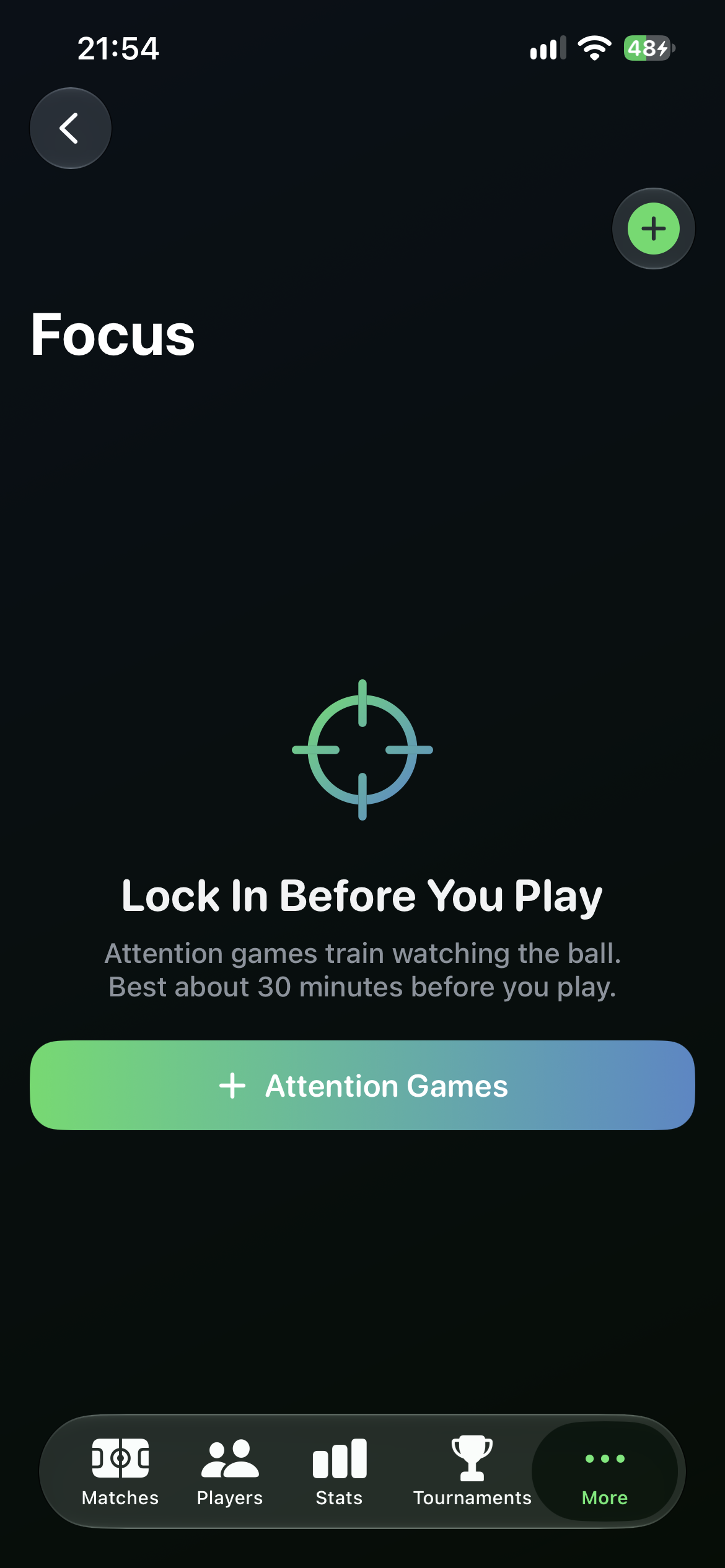
Attention games under More. Open More → Focus. If the list is empty, tap Attention Games (or the +) to start a guided session.
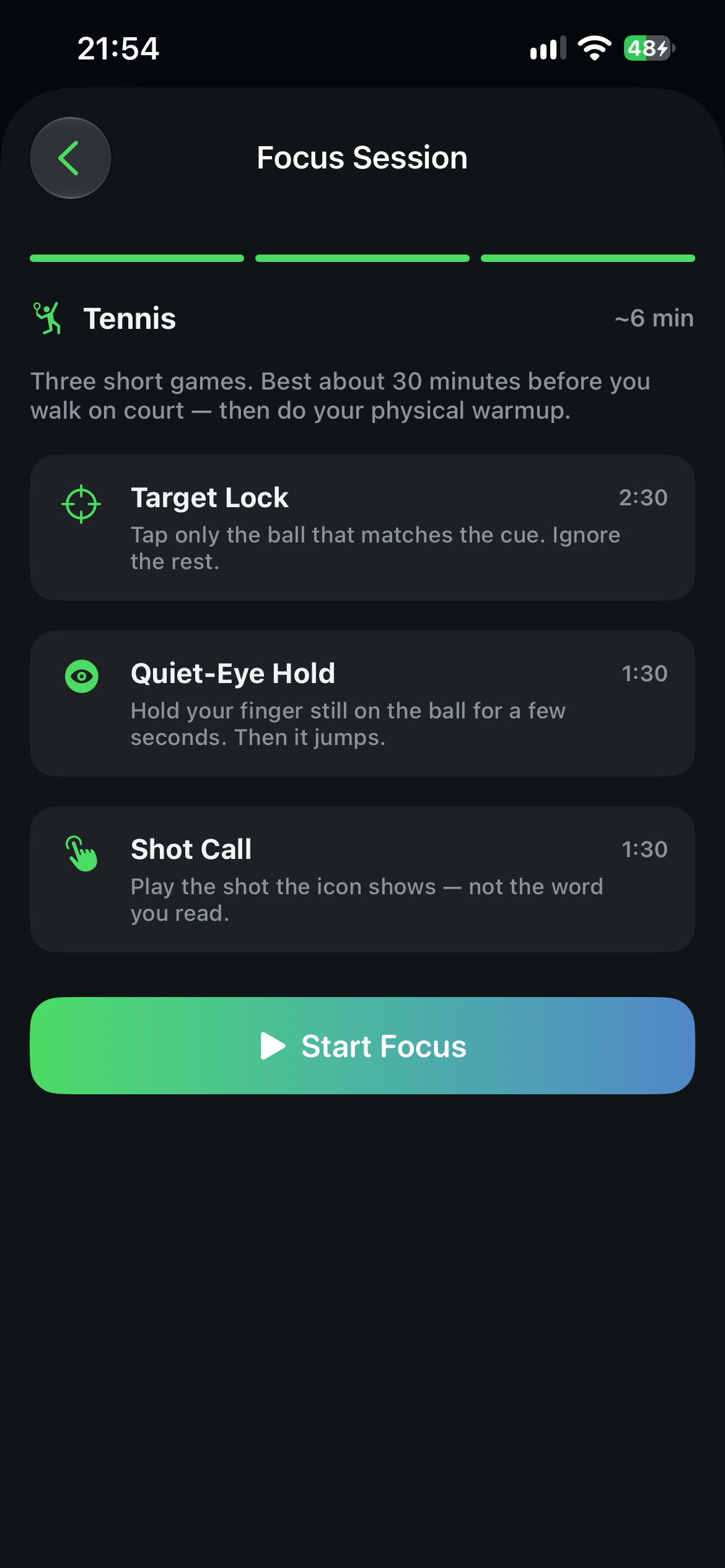
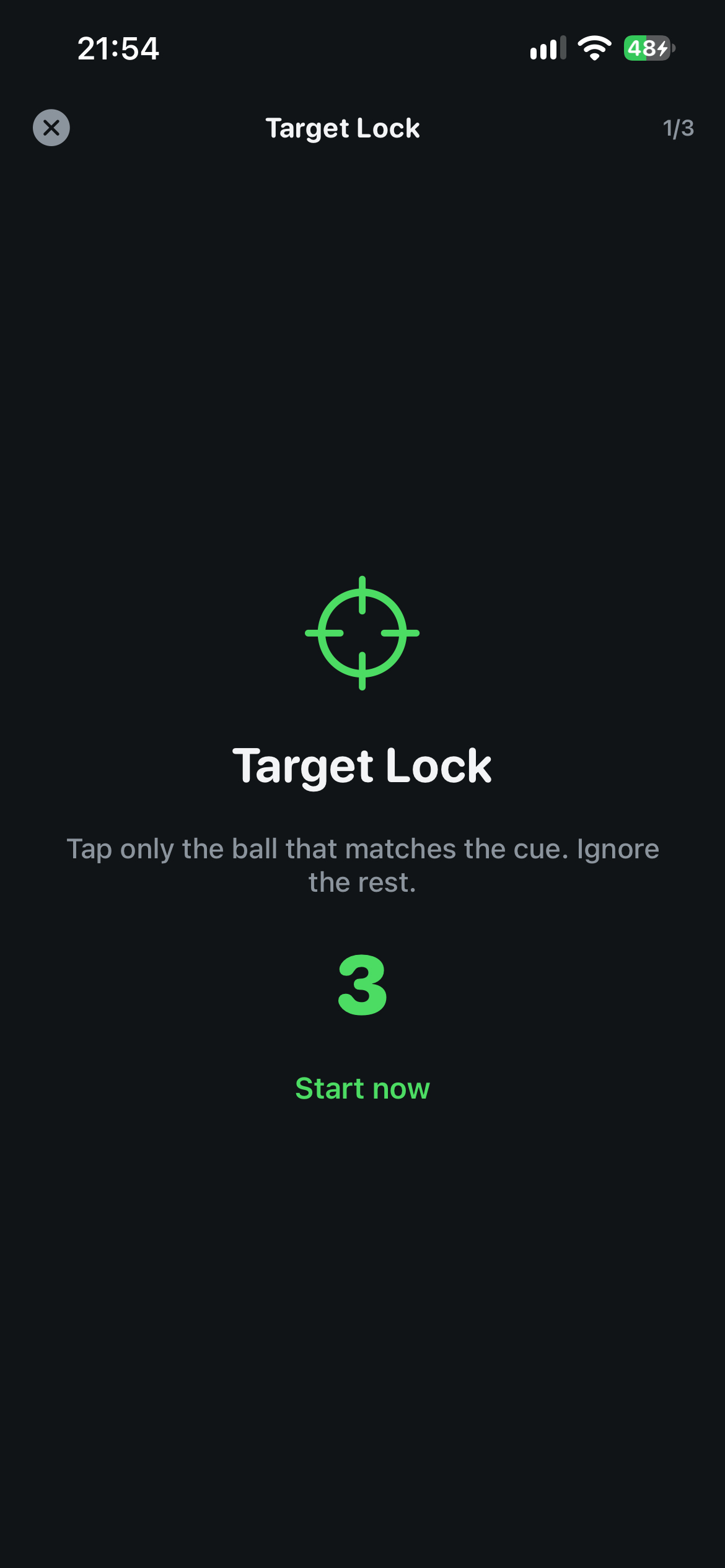
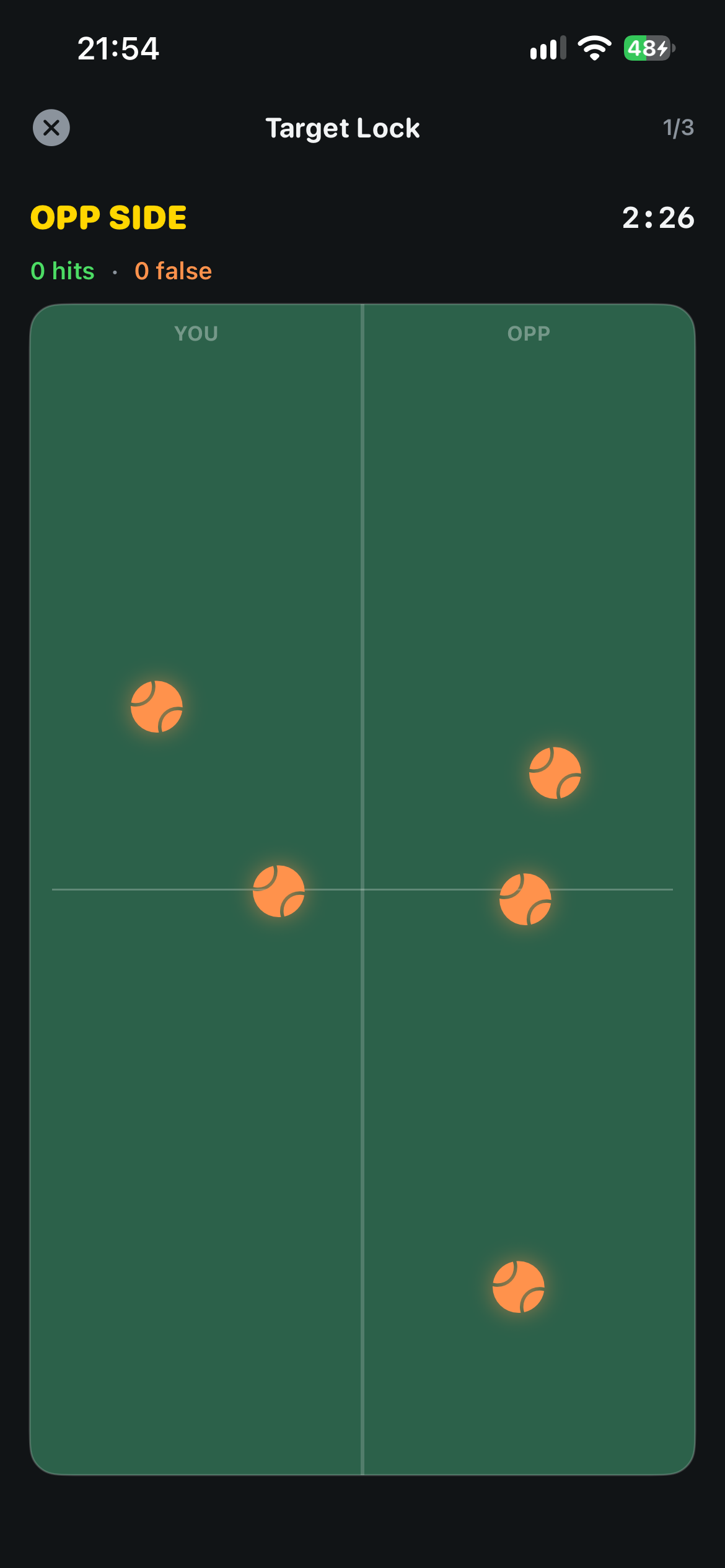
Three games, always in order.Target Lock — tap only the ball that matches the cue. Quiet-Eye Hold — keep your finger still on the ball, then it jumps. Shot Call — play the shot the icon shows, not the word you read. About six minutes total, best around 30 minutes before you walk on court, then do your physical warmup.
On-device. No network call and no LLM. Finished sessions can be saved to your Focus list with the three game scores.
Focus homeSession setupGet ReadyTarget Lock
Match Summary
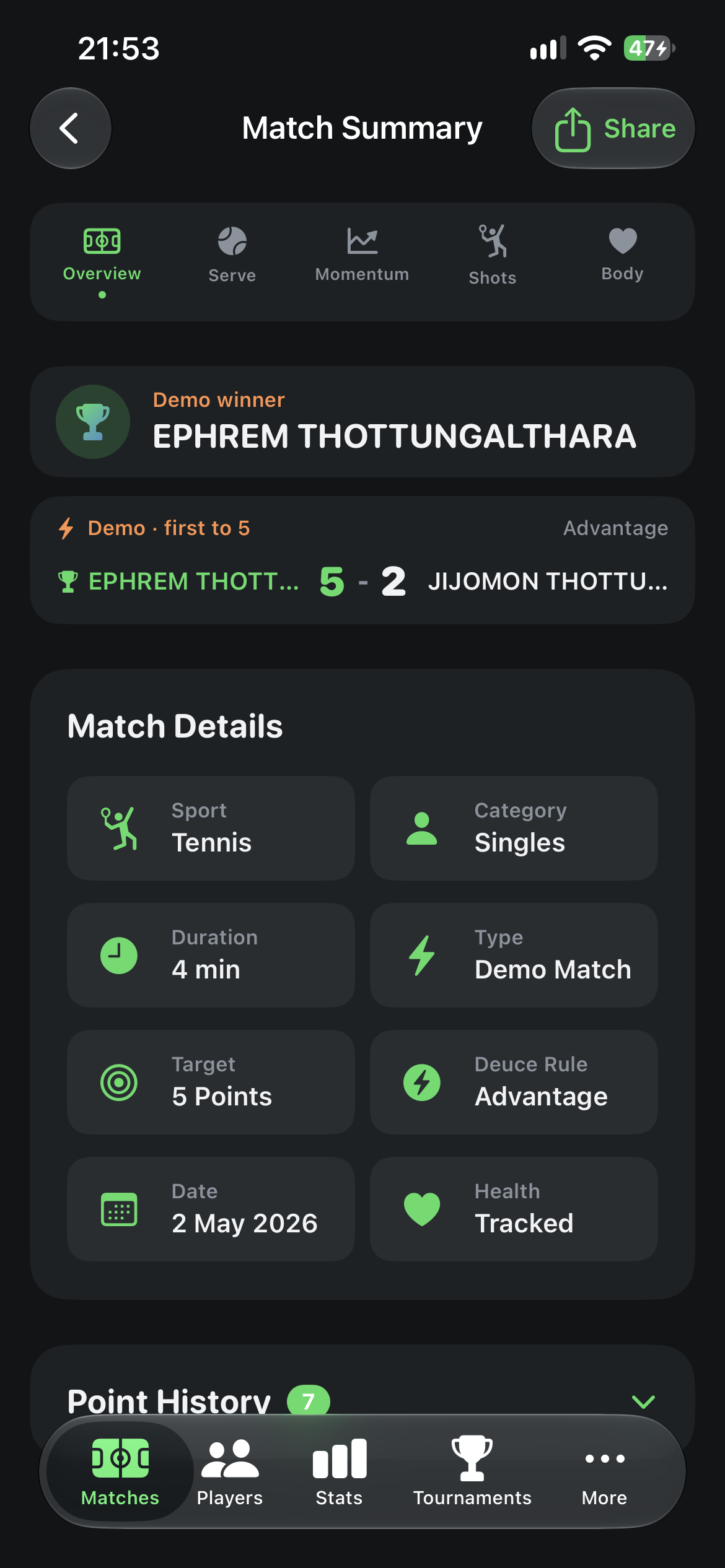
Icon tabs, not a long scroll. After a match, jump between Overview, Serve vs Return, Momentum, Shots and Body from the bar under the score.
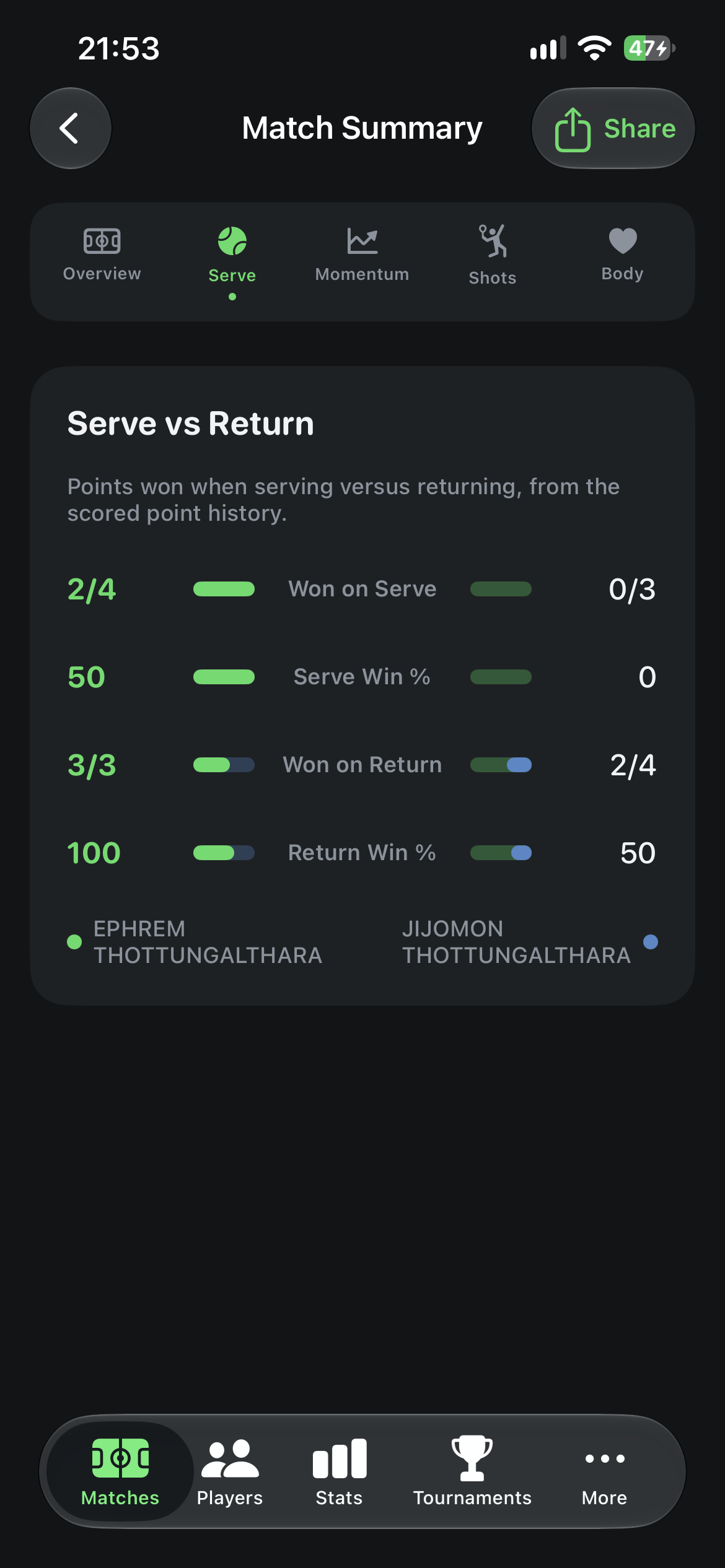
Serve vs Return. Points won on serve versus return, with first-serve and second-serve splits when you have the data.
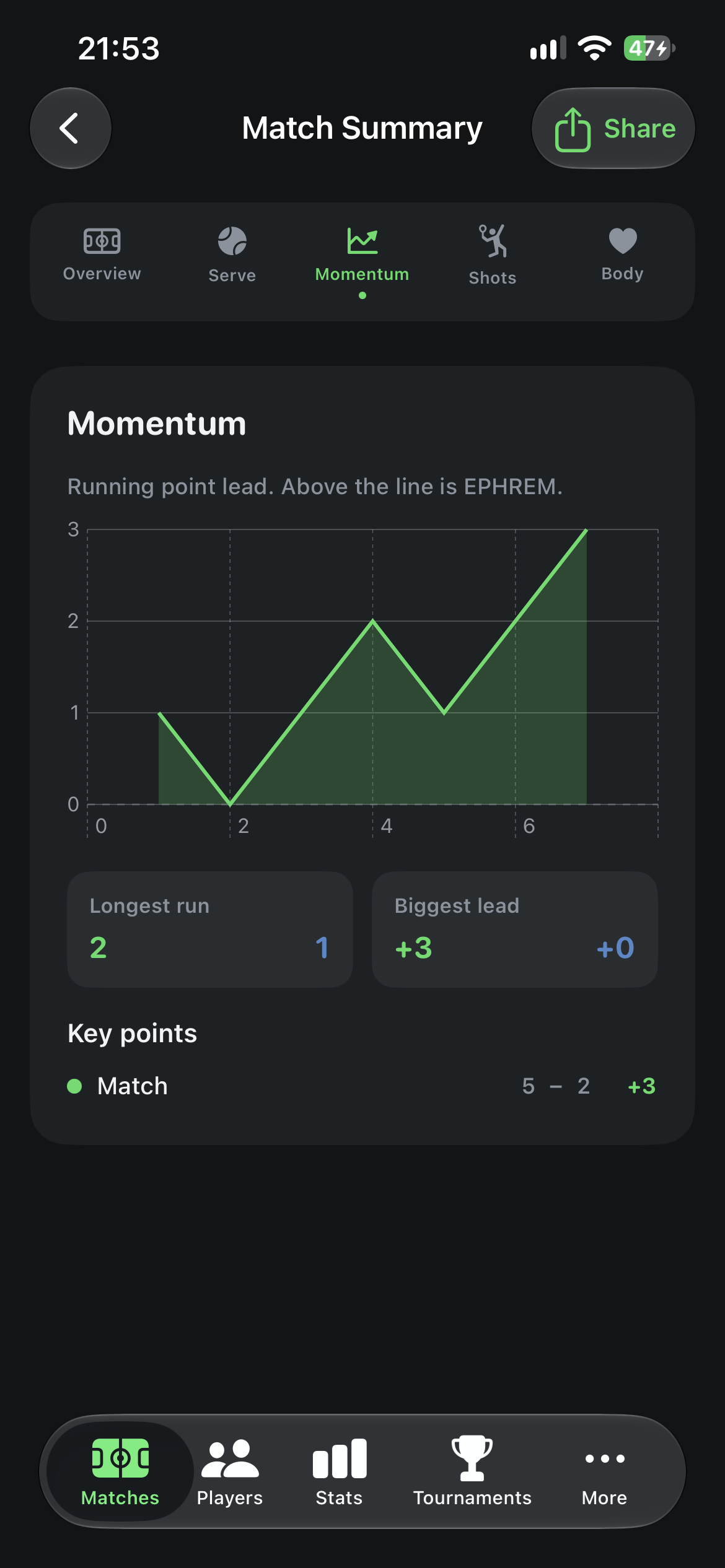
Momentum. How the match swung — key games, breaks and the stretch where each player was in front.
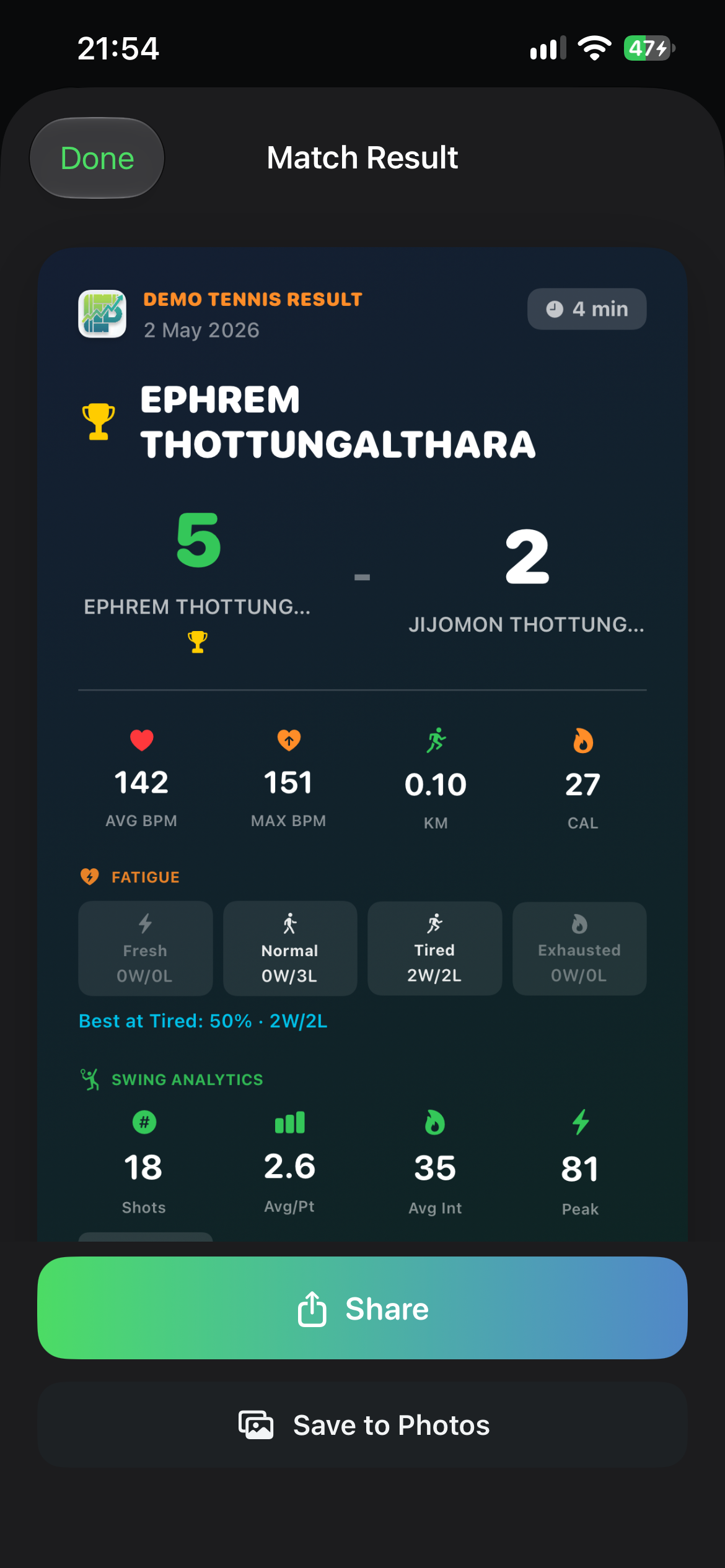
OverviewServe vs ReturnMomentumShare card
Share & backup
Choose what goes on the card. Before you share, toggle Heart Rate, Fatigue, Swing Analytics, Shots Per Point and Rally Length. Then Share or Save to Photos.
Password-encrypted export. New backups are encrypted with a password you choose. You need the same password to restore. Older backups saved without a password still import. If you forget the password, that encrypted file cannot be recovered — CourtsidePlay does not store it in the file.
Improvements
Weather from the toolbar. The local forecast opens from the Matches toolbar instead of a strip on that screen. Court & Wind is unchanged once you open Weather.
Training tab hidden. Training is no longer in the tab bar. Existing training records stay on your device.
Tie-break scores. Tie-break results now read winner-first (for example 10–1) instead of the inverted 1–0 style.
Version 5.5.2 — Change Server from Apple Watch
Released September 6, 2026
You can now switch who is serving during a live match from your wrist. Automatic rotation continues from the new server, and the change syncs to iPhone.
Apple Watch
Change Server on Watch. On the live score screen, tap the Serve: ME / Serve: OPP row, confirm, and the yellow serve indicator flips to the other side.
Rotation continues. After a manual change, automatic server rotation (games, tiebreaks, rally-point sports) starts from the new server.
Syncs to iPhone. The new server is sent to iPhone so both devices stay in agreement — even if the live match screen is not open. If the phone is out of range, the change stays on Watch and is applied on the next sync.
Racket sports. Available during live Tennis, Padel, Beach Tennis, Badminton and demo matches. Swimming and running activities are unchanged.
Version 5.5.1 — Rate CourtsidePlay & Settings Links
Released September 1, 2026
A small housekeeping release: you can now rate CourtsidePlay from inside the app, and Settings gains a direct way to reach us.
Rate CourtsidePlay
In-app rating window. After a milestone — finishing a match, or creating a player, match, tournament, training session, meal plan, warmup or equipment item — a CourtsidePlay card asks how you're getting on. Choose a star rating and tap Submit Review to open the App Store review page, where you confirm and post it.
Asked once. Whether you submit, tap Not Now, or close the card, it won't appear again by itself.
Available any time. Settings → About → Rate CourtsidePlay reopens the same window whenever you want.
Settings
Contact Us. A new section with our support address, info@courtsideplay.com — tap it to open a pre-addressed email.
About. Rate CourtsidePlay now sits alongside Privacy Policy, Terms of Use and Release Notes.
Version 5.5.0 — Meal Planner, Warmup & Equipment
Released August 13, 2026
Three big additions: a new Meals tab brings on-device meal planning to CourtsidePlay; a new Warmup tab builds a guided, sport-specific warmup from your profile with voice-guided timers on iPhone and Apple Watch; and a new Equipment logbook tracks racquets, strings, grips and more with optional photo assist, match gear assignment, restring history, and a green–yellow–orange–red usage graph. Explore the Meal Planner · Explore Warmup · Explore Equipment.
Meal Planner
Meals tab. A new tab in the main tab bar lets you start a guided flow, save generated plans, and revisit them later — swipe to delete any you no longer need.
Five meal occasions. Breakfast, Lunch, Dinner, Pre-Match and Post-Match each shape the suggestion — pre-match leans high-carb and easy to digest, post-match prioritises protein and carbs for recovery.
Optional match linking. Pick one of your existing matches so the plan knows exactly who it's for, or skip it to use your default Apple Watch profile — either way height, weight, biological sex and allergies size the calorie target.
System Auto-Prepare. A built-in, rule-based engine picks a dish from CourtsidePlay's on-device recipe library based on your profile, allergies and today's local weather.
Photograph What I Have. Snap or pick a photo of your available ingredients and Apple's on-device Vision framework identifies what it can; confirm or edit the detected ingredients before a matching recipe is chosen.
Optional calorie limit. Cap the plan at a calorie target on either path, or leave it blank to use a calculated target based on your profile.
Full nutrition breakdown. Every plan shows target vs. actual calories, protein, carbs and fat, plus expandable recipe cards with prep time, tags, allergens, ingredients and step-by-step instructions.
"Why this plan" rationale. A plain-English explanation of every decision — allergy exclusions, climate adjustments, and calorie fit.
Nutrition Profile on players. Player profiles gain a biological sex field and nine toggleable food allergies (peanuts, tree nuts, gluten, dairy, eggs, soy, shellfish, fish, sesame), used to calculate calorie needs and filter out unsafe recipes.
Warmup
Warmup tab. A new guided warmup builder sits alongside Matches, Players, Stats and Tournaments — start a routine, save your session history, and revisit or delete past warmups.
Built from your profile. Routines are sized using your height, weight, age and BMI, with an optional link to an upcoming match so match-day routines add extra sport-specific drills.
Four sports. Choose Tennis, Padel, Beach Tennis or Badminton and the generator adapts sport-specific drills — shadow strokes and serve rehearsal, split-steps, short-court footwork, or court-corner shuttles.
Rule-based routine generator. A five-phase structure (Cardio, Dynamic Stretch, Mobility, Sport-Specific, Activation) scales exercise durations by BMI and age, with a plain-English "Why this routine" rationale.
Voice-guided timers. Each exercise has a "Get Ready" countdown and a timed active phase, read aloud by on-device speech synthesis, with written step-by-step instructions and a progress tracker.
Apple Watch guided session. Send a routine to your Watch and it runs independently with matching voice cues and haptics, then sync the completed (or early-ended) session back to your iPhone with one tap.
Equipment
Equipment logbook. A dedicated hub under More for your Default Watch Profile player — racquets, strings, grips, overgrips, shoes and outfits, filtered by sport.
Optional photo assist. Take or choose up to four photos per item; on-device OCR and classification can suggest category, brand, model and size. Photos are never required — you can enter everything manually or copy details from an existing model.
Cover photo. Pick which of your photos appears in listings.
Racquet setup from inventory. When editing a racquet, select string, grip and overgrip already in your list — brand, model and specs are used from that item, with no new photo needed for a restring.
Tension & strung date. Record tension and when the racquet was strung; saving logs restring, tension, grip and overgrip changes automatically.
Match gear assignment. Optionally assign gear when creating a match so finished matches feed play hours into usage tracking.
Colour usage graph. Every item shows a green → yellow → orange → red meter (Good / Watch / High / Replace) based on play hours — e.g. polyester string caution around 5h, higher break risk around 8h, restring recommended around 12h.
Wear notifications. The phone can notify you when string or other gear crosses a wear band; alerts can fire again after a restring.
History timeline. Match use, restrings, tension changes, grip/overgrip swaps, installs and notes — plus manual “Log History Entry” anytime.
Soft-delete. Remove gear from the main listing while keeping history in the logbook.
Privacy
Fully on-device. Photo-based ingredient and gear detection, the recipe catalog, calorie/macro calculations, warmup generation, equipment inventory and wear calculations all run locally — no LLM, no cloud service, and your kitchen or gear photos are never uploaded for identification.
Version 5.4.0 — Shot Calibration & Court Weather
Released June 17, 2026
Two big additions: Shot Calibration lets you teach CourtsidePlay your own strokes for more accurate shot detection, and a new Weather & Court Wind experience brings a local forecast to your Matches screen with a live court that shows wind, sun and ball-drift. Learn about calibration · Weather & Court Wind.
Shot Calibration
Calibrate per sport. A new Shot Calibration menu lists Tennis, Padel, Beach Tennis and Badminton, each with its own status — not calibrated, in progress, or calibrated.
Guided capture on Apple Watch. Tap Start and the Watch walks you through every shot — forehands, backhands, topspin, slice, volleys, serves, and separate forehand and backhand drops — asking you to play each one a couple of times.
Learns your motion signature. CourtsidePlay records the accelerometer and gyroscope pattern of each stroke and uses a nearest-signature classifier to favour your calibrated labels during matches.
Dominant-hand aware. Calibration uses the dominant hand from your profile, so forehands and backhands map correctly for left and right-handed players.
Optional and reversible. Sports you don't calibrate use the built-in default detector, and you can delete any sport's calibration at any time. Calibration data stays on your devices.
Weather & Court Wind
Local forecast on Matches. A scrolling strip at the top of the Matches screen shows the next three hours in 30-minute steps — temperature, wind, cloud cover, chance of precipitation and humidity — powered by Apple WeatherKit.
Sun-aware condition icon. The icon is tinted by expected sunshine: bright orange for full sun, softer for partial, grey when overcast.
Court & Wind screen. Tap the forecast to open a top-down court that orients to your phone's compass, with a wind arrow, the sun's position (azimuth and elevation), and a North marker aligned to the real world.
Ball-drift demo. See the no-wind path and the wind-affected path side by side for a Serve or Groundstroke, with sideways and lengthwise drift in metres and an adjustable ball-speed slider.
Switch ends. Flip the perspective to preview the other side of the court, updating the wind and sun analysis for that end.
Fast & private. Forecasts are cached for 10 minutes; your location is used only to fetch weather and compute the sun, and is never stored or uploaded.
Version 5.3.1 — Smarter Sync & Sharper Swing Analytics
Released June 10, 2026
A focused update that makes Watch ↔ iPhone sync more dependable and swing analytics more useful on court — especially for tennis and padel.
Fixes
Manual sync brings your full match to iPhone. Heart rate, calories, swing counts, and shot-by-shot history now arrive together when you tap Sync to iPhone — so Match Summary looks complete even if you never opened the phone during play.
Demo matches finish at the right score. Matches — especially quick demo games on Apple Watch — no longer stop one point before the target you set.
Watch and iPhone stay aligned. Final scores match what you actually played, including when you use Auto sync or finish a match from your wrist.
Swing analytics (Tennis & Padel)
Volleys and drop shots are back. Net taps and soft drops at the front of the court are recognised again in your shot breakdown — important for padel, where most rallies happen at the net.
Smarter serve counting in tennis. Only your actual serve at the start of a point is labelled Serve — not every overhead you hit later in the rally while you're still serving the game.
More accurate padel serves. Bouncing the ball before you serve no longer shows up as a serve in your stats.
Better topspin reads. Heavy topspin forehands and backhands are more likely to show as topspin instead of flat drives in your spin breakdown.
Padel overheads. Bandeja and vibora shots are separated more reliably from plain smashes in your analytics.
Version 5.3.0 — Auto & Manual Watch ↔ iPhone Sync
Released May 31, 2026
When you score on Apple Watch, you can now choose how the match reaches your iPhone: Auto streams every point live, or Manual keeps the full match on your wrist until you tap Sync to iPhone. Manual sync sends the complete authoritative scoreboard plus heart rate, swing analytics, and point-by-point history — so Match Summary is fully populated even for Watch-only matches. Works across Tennis, Padel, Beach Tennis, Badminton and demo formats. Learn more about sync.
New
Score Sync in match setup (iPhone). For matches scored on Apple Watch, choose Auto or Manual in Create Match — same option you already know from endurance sports, now available for all racket and demo sports.
Auto sync. Every point streams to the iPhone as you play, so the phone scoreboard tracks the Watch in real time.
Manual sync. The Watch holds the complete match. After you finish — or later from the completed-match list — tap Sync to iPhone when both devices are in range. The iPhone rebuilds score, sets/games, and match status from the Watch snapshot.
Persistent Sync button on Watch. In Manual mode the finished-match screen stays open so Sync to iPhone no longer disappears after a couple of seconds.
Sync for completed matches. Matches that finished on the Watch but never reached the phone show a sync action in the Watch match list so you can send them later.
Full manual-sync payload. One tap also transfers heart-rate time series and workout totals (calories, distance, steps), pending swing batches, and the Watch's point-by-point log so per-point HR and swing analytics attach correctly on iPhone.
Score Sync on Match Detail (iPhone). Completed and scheduled Watch-scored matches show which sync mode was selected.
Improvements
Reliable badminton & rally scoring on Watch. Manual full-state sync repairs drift from the incremental point stream, especially for rally-scored sports.
Match status after sync. When a manual sync delivers a completed or retired match, iPhone updates status and clears live points so the match no longer looks in progress.
Badminton serve detection. Serves are identified from match state (who is serving at rally start) rather than motion alone, reducing mislabels such as lobs on the first stroke.
Manual sync shows a clear error when the iPhone is not reachable; your match stays stored safely on the Watch until you try again.
Version 5.2.0 — Badminton & Sport-Aware Shot Detection
Released May 22, 2026
Badminton joins Tennis, Padel and Beach Tennis as a first-class sport, with BWF rally scoring on iPhone and Apple Watch, a dedicated motion classifier that opens a serve window at the start of every rally, and rock-solid Watch ↔ iPhone synchronisation of the current server. Plus a tighter swing pipeline across all racket sports.
New
Badminton. Choose Badminton when creating a match. Defaults follow BWF rules: rally scoring to 21, deuce to a 30-point cap, best of 3 games. Points, games, deuce and game-point indicators all update live on both iPhone and Apple Watch.
Configurable points and games. A slider in match configuration lets you customise the points per game and games per match, so casual or club-house formats are one tap away from the standard BWF defaults.
Badminton shot classification. A dedicated motion pipeline labels serves, forehands, backhands, smashes, drops, slices and lobs from accelerometer and gyroscope patterns on the wrist. At the start of every rally a serve window opens, and only the current server's stroke is labelled as Serve — once the rally is live, classification switches to groundstrokes and overheads.
Server indicator on Apple Watch. A small dot next to the player tag (ME / OPP) shows who is serving the current rally, and the indicator updates as the server changes after each rally.
Sport badge on the Watch. Live and configuration flows now show a concise BADMINTON tag, matching the existing PADEL and BEACH badges.
Improvements
Solid Watch ↔ iPhone sync for badminton. Structural fields (current server, games, deuce state, player names) merge cleanly when the Watch is the scoring device, without overwriting live rally points that the Watch is tracking.
Live serve context. The shot detector refreshes the badminton serve window after every point — including new games — so the Serve label keeps tracking who actually serves next.
Shot-power estimates use badminton-appropriate lever and mass assumptions for tip speed and watts.
List and detail badges on iPhone show the right sport and colours for Tennis, Padel, Beach Tennis and Badminton.
Version 5.0.0 — Beach Tennis, Match Sheets & Smart Undo
Released May 1, 2026
A major release: Beach Tennis joins Tennis and Padel, the Match Summary becomes a downloadable PDF match sheet, the Apple Watch gains long-press undo, and the deciding-set rule now offers three clearly-labelled options. Plus a full data backup workflow, an experimental outdoor running-speed metric, and across-the-board sport-label fixes.
New
Beach Tennis. Choose Beach Tennis when creating a match — scoring matches classic tennis logic, with sensible defaults including a 10-point match tiebreak as the deciding set, suited to typical beach tournaments.
Downloadable Match Sheet (PDF). From any completed Match Summary, tap the share menu and choose Download PDF to get a print-friendly match sheet — final score, set-by-set table, match details, health & fitness summary, total match time, swing analytics and point-by-point history — branded with the CourtsidePlay logo and footer.
Total match time in the Match Summary, surfaced both in Match Info and the Health & Fitness card.
Smart deciding-set tiebreak. Match configuration now offers three clearly-labelled options for the deciding set when sets are tied: Regular Set (normal 6-game set, 7-point tiebreak at 6-6), 7-point Match Tiebreak, or 10-point Match Tiebreak. Applies to Tennis, Padel and Beach Tennis. Existing matches automatically map to the closest option.
Long-press to undo on Apple Watch. Tap-and-hold the score on the Watch for ~0.7s to undo the last point. The undo flows to the iPhone too, so phone and Watch stay in sync (in-progress points/games/sets are reverted; finished matches are not touched).
Experimental: outdoor running speed. For tennis matches configured on an outdoor surface, the Apple Watch now estimates your max sprint speed during points (km/h) using GPS. Marked clearly as Experimental in the Match Summary; disabled for indoor courts, padel, and beach tennis.
Experimental: Court Heatmap (singles outdoor tennis). The Match Summary gains a new Court Heatmap tile that opens a dedicated sheet showing where you spent time on your half of the court during the match — derived from your Apple Watch GPS, with no setup needed (auto-calibrated from your first serves). Includes a 6-zone breakdown with per-zone time share, an overall quality score, and a one-tap share-as-image. Marked Experimental; available only for singles outdoor tennis.
Export & import your data. Open Settings (gear icon on the Matches tab), then Export All Data to save a single JSON archive (players, matches, training sessions, tournaments) via the share sheet — or Import / Recover to restore from that file. Existing records are preserved when IDs match.
App language shortcut. Settings links to system language preferences for CourtsidePlay (alongside Privacy & Release Notes on the web).
Improvements
Match configuration redesigned for clarity, with a context-aware caption that explains when the deciding-set rule kicks in (best-of-3 vs best-of-5).
Better Slice detection. Apple Watch shot-type recognition more reliably classifies slice shots — fewer slices misread as flat backhands, with separate handling for one-handed and two-handed backhands.
Correct sport on shared cards. Share images and headings use the sport you played (including Beach Tennis), not a generic label.
Apple Watch sport tags. Live and setup flows show concise tags (PADEL / BEACH) and the subtitle uses the correct sport name; plain tennis stays uncluttered.
Shot-type & swing analytics. On Watch, motion classification treats Beach Tennis like Tennis (not Padel): serve/groundstroke thresholds and spin heuristics follow the tennis path, which matches paddle-style swings on sand better than padel-specific rules.
Swing-power estimates. Beach Tennis uses paddle-appropriate lever and mass assumptions for tip speed and watts.
List and detail badges on iPhone show the right sport and colours for Tennis, Padel and Beach Tennis.
Version 1.0.2 — Live Score Reliability
Released April 30, 2026
Smaller release focused on the in-match scoring screen and protecting your post-match health summary.
Fixes
The current point score (15 / 30 / 40 / AD) now updates instantly on iPhone as you tap — no more "back out and reopen the match to see the score".
Deuce, Advantage and Killer Point indicators now refresh in real time.
Picking a point type (Ace, Winner, Unforced Error, …) no longer interrupts heart-rate tracking, so the post-match Health Summary keeps its full HR curve and Min / Avg / Max.
Under the hood
Rewired the live match screen to Swift's new Observation framework so score updates propagate through every panel from the first render.
Health tracking now stops only at the natural match boundaries (Finish, Retire, end-of-match), preventing partial summaries.
Version 1.0.1 — Power, Heart-Rate Zones & Sharper Analytics
Released April 27, 2026
New
Estimated Swing Power. The Match Summary now shows your average and peak racquet-tip speed (km/h) and swing power (W), personalized from your height and weight in Apple Health.
Heart-Rate Zones breakdown. After every tracked match, see how much time you spent in each of the 5 HR zones — computed from your age and per-point heart rate.
Date of Birth on player profiles, used to power age-based heart-rate zones and richer health analytics.
Improvements
Peak Intensity in Swing Analytics is more accurate; it no longer saturates at 100 on light rallies.
Apple Watch status on the training-setup screen is more reliable after a fresh install or when the Watch is asleep.
When a match finishes on iPhone, the Apple Watch app now closes cleanly and no longer shows a stale "one point short" score.
Version 1.0.0 - First Release
Released April 25, 2026
CourtsidePlay launches as a complete iPhone + Apple Watch experience for tennis and padel players, focused on fast score tracking and practical performance insights.
Match Tracking
Live match scoring for tennis and padel in singles and doubles.
Support for sets, games, tiebreak rules, deuce/advantage, and demo match formats.
Quick start for scheduled or instant matches, plus full match summaries after completion.
Apple Watch Companion
Score from your wrist with tap controls and real-time sync to iPhone.
Live score display and haptic feedback for key match actions.
Watch-first flow for easier on-court use between points.
Tournaments and FITP Integration
Create and manage tournament entries directly inside the app.
Fetch tournament details from FITP sources to speed up setup and tracking.
Fetch publicly available player profile data from FITP.
Note: FITP integration is currently available for Italy only.
Health and Fitness
Heart rate tracking (current, average, minimum, maximum) during matches and training.
Activity metrics including distance, steps, and calories.
Fatigue indicators and readiness-style insights to help understand performance trends.
Performance Analytics
Swing analytics with shot count, average intensity, peak intensity, and peak G-force.
Shot-type and rally analysis, including spin distribution views and intensity breakdowns.
Detailed post-match dashboard for reviewing patterns and improvement areas.
Sharing and Privacy
Share-ready match summary cards for social and messaging apps.
Data-first privacy approach: key match and health data stays on your devices.
Thank you for downloading CourtsidePlay. This is just the beginning, and more upgrades are already planned.
Note di Rilascio
Ultimo aggiornamento: 30 Settembre 2026
Versione 5.7 — Condividi una partita finita
Rilasciato il 30 Settembre 2026
Dopo che una partita di Tennis, Padel, Beach Tennis o Badminton è completata o ritirata, i due giocatori possono stare vicini e condividere quella partita con un QR. Durante il gioco non viene inviato nulla. Il codice appartiene alla partita sullo schermo. Come funziona la condivisione.
Da quella partita
Condividi questa partita con QR. Apri il riepilogo della partita finita, tocca Condividi e scegli Condividi questa partita con QR. La scansione avviene sulla stessa schermata.
Solo questa partita. L'elenco Partite non ha uno scanner e il codice non si aggancia a un'altra partita.
Nelle vicinanze. Il QR è un codice di abbinamento valido 10 minuti. Usa Aggiorna il QR di questa partita se scade. I punti viaggiano dopo che i telefoni si collegano. Il collegamento è cifrato e resta tra i due telefoni. CourtsidePlay non carica la partita.
Stessa configurazione. Entrambi i telefoni devono avere una partita finita con lo stesso sport e lo stesso punteggio. Se la configurazione non coincide, la scansione viene rifiutata.
Condividi questa partitaIn attesa
ConnessioneConfronto
Che cosa confronti
Sforzo. La Panoramica mostra la potenza di swing (velocità media e di picco della racchetta, più i watt stimati), la distanza e le calorie. Distanza e calorie compaiono se la condivisione salute è attiva. La tua potenza usa altezza e peso salvati sul giocatore. La velocità di racchetta dell'avversario usa un corpo standard di 175 cm e 70 kg, perché altezza e peso non vengono condivisi.
Punti. Il riepilogo mostra i punti registrati allo stesso modo, i conflitti e i punti presenti su un solo telefono.
Colpi e frequenza cardiaca. I colpi dell'avversario sono nel riquadro Colpi. La frequenza cardiaca compare se quel giocatore include la salute. I dati salute ricevuti non vengono scritti in Apple Health.
Questo flusso è separato dalla sincronizzazione Watch-iPhone, che sposta la tua partita tra il tuo orologio e il tuo telefono.
Versione 5.6.5 — Forma in partita, conteggio colpi e crescita fisica
Rilasciato il 23 Settembre 2026
Il profilo giocatore mostra come vinci i punti, il riepilogo partita conta ogni tipo di colpo, e puoi registrare altezza, peso e test in campo nel tempo. La mano dominante è obbligatoria, così dritto e rovescio si leggono dal polso della racchetta. La calibrazione sull'Apple Watch conta un colpo come una ripetizione, anche con uno shadow swing senza palla.
Forma in partita
Ultima partita sul profilo. Forma in partita elenca Servizio, lunghezza dello scambio (1–3, 4–8, 9–15 e 16+ colpi) e ogni tipo di colpo dell'ultima partita che ha quei dati.
Tocca una riga per lo storico. Ogni riga è i punti vinti. Aprilo per vedere quella metrica nel tempo. La linea compare quando la stessa metrica è stata registrata in due partite.
Segnati nel foglio punti. Insieme al punto puoi indicare il colpo e la lunghezza dello scambio. Tennis e padel possono anche segnare un fallo al primo servizio. Sono questi dati che legge Forma in partita.
Forma in partitaTipi di colpo
Conteggio colpi
Riquadro Colpi. Un anello e una tabella mostrano quanti colpi di ogni tipo hai giocato e la quota sulla partita — dritto, rovescio, smash, slice e gli altri tipi segnati sul punto.
Crescita fisica
Check-in datati. Sul giocatore salvi altezza e peso in una data. Il check-in successivo è ciò con cui i grafici confrontano. Esporta il registro dal pulsante di condivisione.
Test in campo opzionali. Un check-in può usare la frequenza a riposo da Apple Health, più apertura alare, presa, salto verticale, sprint 10 m, spider o ventaglio, lancio della palla medica e plank. Lascia vuoto un test se non l'hai misurato. È un diario di allenamento, non una valutazione medica. La frequenza della partita non entra nel valore a riposo.
Altezza e pesoCheck-in
Anche in questo aggiornamento
Frequenza cardiaca rispetto alle tue partite. Dopo 30 minuti, minima, media e massima si confrontano con le tue partite abituali. Il confronto è nel riepilogo e nel foglio partita.
Velocità di swing ATP. Una partita di tennis si può confrontare con la velocità di swing della Top 100 ATP.
Una ripetizione per colpo. Sull'Apple Watch un gesto di prova — anche uno shadow swing senza palla — viene salvato una sola volta.
Eva su questo sito. Il pulsante in basso a destra, Eva, risponde alle domande sul sito e collega la pagina giusta. La conversazione resta in questa scheda del browser finché non la chiudi.
Versione 5.6.0 — Giochi Focus e tab Riepilogo Partita
Rilasciato il 17 Settembre 2026
Un nuovo tab Focus allena lo sguardo sulla palla prima di giocare, e il Riepilogo Partita usa una barra di icone per passare tra Panoramica, Servizio vs Risposta, Momentum, Colpi e Corpo. Nello stesso aggiornamento: condivisione del risultato, backup cifrati con password e alcune correzioni alle statistiche. Scopri Focus.
Focus
Giochi di attenzione in Altro. Apri Altro → Focus. Se l'elenco è vuoto, tocca Giochi di Attenzione (o il +) per avviare la sessione guidata.
Tre giochi, sempre nello stesso ordine.Target Lock — tocca solo la palla del segnale. Quiet-Eye Hold — tieni il dito fermo sulla palla, poi salta. Shot Call — gioca il colpo dell'icona, non la parola che leggi. Circa sei minuti, ideali 30 minuti prima di scendere in campo, poi il riscaldamento fisico.
Sul dispositivo. Nessuna chiamata di rete e nessun LLM. Le sessioni finite si possono salvare nell'elenco Focus con i tre punteggi.
Home FocusConfigurazionePreparatiTarget Lock
Riepilogo Partita
Tab a icone, non uno scroll infinito. Dopo la partita passi tra Panoramica, Servizio vs Risposta, Momentum, Colpi e Corpo dalla barra sotto il punteggio.
Servizio vs Risposta. Punti vinti al servizio e in risposta, con split primo e secondo servizio quando i dati ci sono.
Momentum. Come è girata la partita — game chiave, break e i tratti in cui ciascun giocatore era avanti.
PanoramicaServizio vs RispostaMomentumCard di condivisione
Condivisione e backup
Scegli cosa finisce sulla card. Prima di condividere puoi attivare o disattivare frequenza cardiaca, fatica, analisi swing, colpi per punto e lunghezza scambio. Poi Condividi o Salva in Foto.
Export cifrato con password. I nuovi backup sono cifrati con una password che scegli tu. Serve la stessa password per ripristinare. I backup più vecchi senza password si importano ancora. Se dimentichi la password, quel file cifrato non è recuperabile — CourtsidePlay non la memorizza nel file.
Miglioramenti
Meteo dalla barra. La previsione locale si apre dalla barra di Partite, non più da una striscia su quella schermata. Campo e Vento resta invariato una volta aperto Meteo.
Tab Allenamento nascosto. Allenamento non è più nella tab bar. I record esistenti restano sul dispositivo.
Punteggi tie-break. I tie-break si leggono ora vincitore-primo (es. 10–1) invece dello stile invertito 1–0.
Versione 5.5.2 — Cambia battitore da Apple Watch
Rilasciato il 6 Settembre 2026
Ora puoi cambiare chi batte durante una partita in corso dal polso. La rotazione automatica riparte dal nuovo battitore e la modifica si sincronizza con iPhone.
Apple Watch
Cambia battitore sul Watch. Nella schermata del punteggio live, tocca la riga Battuta: IO / Battuta: AVV, conferma, e l'indicatore giallo passa all'altro lato.
La rotazione continua. Dopo un cambio manuale, la rotazione automatica (game, tiebreak, sport a punto per punto) riparte dal nuovo battitore.
Sincronizza con iPhone. Il nuovo battitore viene inviato all'iPhone così i due dispositivi restano allineati — anche se la schermata live non è aperta. Se il telefono è fuori portata, la modifica resta sul Watch e viene applicata al prossimo sync.
Sport con racchetta. Disponibile nelle partite live di Tennis, Padel, Beach Tennis, Badminton e demo. Nuoto e corsa restano invariati.
Versione 5.5.1 — Valuta CourtsidePlay e Link nelle Impostazioni
Rilasciato il 1 Settembre 2026
Un piccolo aggiornamento di manutenzione: ora puoi valutare CourtsidePlay dall'app e le Impostazioni offrono un modo diretto per contattarci.
Valuta CourtsidePlay
Finestra di valutazione nell'app. Dopo un traguardo — al termine di una partita, oppure creando un giocatore, una partita, un torneo, un allenamento, un piano alimentare, un riscaldamento o una voce di attrezzatura — una scheda CourtsidePlay ti chiede come ti trovi. Scegli le stelle e tocca Invia recensione per aprire la pagina di recensione dell'App Store, dove confermi e pubblichi.
Chiesto una volta sola. Che tu invii la recensione, tocchi Non ora o chiuda la scheda, non ricomparirà da sola.
Sempre disponibile. Impostazioni → Info → Valuta CourtsidePlay riapre la stessa finestra quando vuoi.
Impostazioni
Contattaci. Una nuova sezione con il nostro indirizzo di supporto, info@courtsideplay.com — toccalo per aprire un'email già indirizzata.
Info. Valuta CourtsidePlay si affianca ora a Privacy Policy, Termini di Utilizzo e Note di Rilascio.
Versione 5.5.0 — Piano Alimentare, Riscaldamento e Attrezzatura
Rilasciato il 13 Agosto 2026
Tre grandi aggiunte: un nuovo tab Pasti porta la pianificazione alimentare sul dispositivo; un nuovo tab Riscaldamento costruisce una routine guidata e specifica per sport dal tuo profilo, con timer a guida vocale su iPhone e Apple Watch; e un nuovo registro Attrezzatura traccia racchette, corde, grip e altro con assistenza foto opzionale, assegnazione alle partite, cronologia ricordatature e un grafico di utilizzo verde–giallo–arancio–rosso. Scopri il Piano Alimentare · Scopri il Riscaldamento · Scopri Attrezzatura.
Piano Alimentare
Tab Pasti. Un nuovo tab nella barra principale ti permette di avviare un flusso guidato, salvare i piani generati e rivederli in seguito — scorri per eliminare quelli che non ti servono più.
Cinque occasioni alimentari. Colazione, Pranzo, Cena, Pre-Partita e Post-Partita determinano ciascuna il suggerimento — il pre-partita privilegia carboidrati facili da digerire, il post-partita dà priorità a proteine e carboidrati per il recupero.
Collegamento partita opzionale. Scegli una delle tue partite esistenti così il piano sa esattamente per chi è, oppure saltalo per usare il tuo profilo Apple Watch predefinito — in entrambi i casi altezza, peso, sesso biologico e allergie calibrano il target calorico.
Preparazione Automatica. Un motore integrato basato su regole sceglie un piatto dalla libreria di ricette sul dispositivo di CourtsidePlay in base al tuo profilo, alle allergie e al meteo locale di oggi.
Fotografa ciò che ho. Scatta o scegli una foto dei tuoi ingredienti disponibili e il framework Vision di Apple sul dispositivo identifica ciò che può; conferma o modifica gli ingredienti rilevati prima che venga scelta una ricetta corrispondente.
Limite calorico opzionale. Imposta un tetto calorico per il piano su entrambi i percorsi, oppure lascialo vuoto per usare un target calcolato in base al tuo profilo.
Quadro nutrizionale completo. Ogni piano mostra calorie target rispetto a quelle effettive, proteine, carboidrati e grassi, più schede ricetta espandibili con tempo di preparazione, tag, allergeni, ingredienti e istruzioni passo-passo.
Motivazione "Perché questo piano". Una spiegazione in linguaggio semplice di ogni decisione — esclusioni per allergia, aggiustamenti climatici e aderenza calorica.
Profilo Nutrizionale sui giocatori. I profili giocatore guadagnano un campo sesso biologico e nove allergie alimentari attivabili (arachidi, frutta a guscio, glutine, latticini, uova, soia, crostacei, pesce, sesamo), usate per calcolare il fabbisogno calorico ed escludere ricette non sicure.
Riscaldamento
Tab Riscaldamento. Un nuovo generatore di riscaldamenti guidati si affianca a Partite, Giocatori, Statistiche e Tornei — avvia una routine, salva lo storico delle sessioni e rivedi o elimina i riscaldamenti passati.
Costruito dal tuo profilo. Le routine sono calibrate su altezza, peso, età e BMI, con un collegamento opzionale a una partita in programma così le routine del giorno di gara aggiungono esercizi extra specifici per sport.
Quattro sport. Scegli Tennis, Padel, Beach Tennis o Badminton e il generatore adatta gli esercizi specifici — colpi a vuoto e servizio a vuoto, split-step, footwork da campo corto o spostamenti agli angoli.
Generatore di routine basato su regole. Una struttura in cinque fasi (Cardio, Stretching Dinamico, Mobilità, Specifico per Sport, Attivazione) calibra le durate degli esercizi in base a BMI ed età, con una motivazione "Perché questa routine" in linguaggio semplice.
Timer con guida vocale. Ogni esercizio ha un conto alla rovescia "Preparati" e una fase attiva a tempo, letta ad alta voce dalla sintesi vocale sul dispositivo, con istruzioni scritte passo-passo e un tracker di avanzamento.
Sessione guidata su Apple Watch. Invia una routine al tuo Watch e la eseguirà in autonomia con le stesse indicazioni vocali e vibrazioni, poi sincronizza con un tocco la sessione completata (o terminata in anticipo) sul tuo iPhone.
Attrezzatura
Registro attrezzatura. Un hub dedicato sotto Altro per il giocatore del Profilo Watch Predefinito — racchette, corde, grip, overgrip, scarpe e outfit, filtrabili per sport.
Assistenza foto opzionale. Scatta o scegli fino a quattro foto per voce; OCR e classificazione sul dispositivo possono suggerire categoria, marca, modello e taglia. Le foto non sono mai obbligatorie — puoi inserire tutto a mano o copiare i dettagli da un modello già in elenco.
Foto di copertina. Scegli quale foto compare negli elenchi.
Setup racchetta dall'inventario. In modifica racchetta selezioni corda, grip e overgrip già presenti — marca, modello e specifiche si usano da quella voce, senza nuova foto per una ricordatatura.
Tensione e data di cordatura. Registra tensione e quando è stata cordata; salvando si registrano automaticamente ricordatatura, tensione, grip e overgrip.
Assegnazione alle partite. Opzionalmente assegna l'attrezzatura in creazione partita così le partite finite alimentano le ore di gioco nel tracking di utilizzo.
Grafico di utilizzo a colori. Ogni voce mostra un misuratore verde → giallo → arancio → rosso (Good / Watch / High / Replace) in base alle ore di gioco — es. corda poliestere in attenzione intorno alle 5 ore, rischio rottura più alto intorno alle 8, ricordatatura consigliata intorno alle 12.
Notifiche di usura. Il telefono può avvisarti quando corda o altra attrezzatura supera una soglia; dopo una ricordatatura gli avvisi possono ripartire.
Cronologia. Uso in partita, ricordatature, tensioni, cambi grip/overgrip, installazioni e note — più “Registra voce di cronologia” manuale in qualsiasi momento.
Eliminazione soft. Nascondi l'attrezzatura dall'elenco principale conservando la cronologia nel registro.
Privacy
Interamente sul dispositivo. Il riconoscimento di ingredienti e attrezzatura dalla foto, il catalogo ricette, i calcoli di calorie/macro, la generazione delle routine di riscaldamento, l'inventario attrezzatura e i calcoli di usura funzionano tutti localmente — nessun LLM, nessun servizio cloud, e le foto di cucina o attrezzatura non vengono mai caricate per l'identificazione.
Versione 5.4.0 — Calibrazione Colpi e Meteo in Campo
Rilasciato il 17 Giugno 2026
Due grandi aggiunte: la Calibrazione Colpi ti permette di insegnare a CourtsidePlay i tuoi colpi per un rilevamento più preciso, e la nuova esperienza Meteo e Vento in Campo porta una previsione locale nella schermata Partite con un campo dal vivo che mostra vento, sole e deriva della palla. Scopri la calibrazione · Meteo e Vento in Campo.
Calibrazione Colpi
Calibra per sport. Un nuovo menu Calibrazione Colpi elenca Tennis, Padel, Beach Tennis e Badminton, ognuno con il proprio stato — non calibrato, in corso o calibrato.
Cattura guidata su Apple Watch. Tocca Avvia e il Watch ti guida colpo per colpo — dritti, rovesci, topspin, slice, volée, servizi e drop di dritto e rovescio separati — chiedendoti di giocare ognuno un paio di volte.
Impara la tua firma di movimento. CourtsidePlay registra il pattern di accelerometro e giroscopio di ogni colpo e usa un classificatore a firma più vicina per privilegiare le tue etichette calibrate durante le partite.
Consapevole della mano dominante. La calibrazione usa la mano dominante del tuo profilo, così dritti e rovesci vengono mappati correttamente per mancini e destrimani.
Facoltativa e reversibile. Gli sport che non calibri usano il rilevatore predefinito integrato e puoi eliminare la calibrazione di qualsiasi sport quando vuoi. I dati di calibrazione restano sui tuoi dispositivi.
Meteo e Vento in Campo
Previsione locale in Partite. Una striscia scorrevole in cima alla schermata Partite mostra le prossime tre ore a intervalli di 30 minuti — temperatura, vento, nuvolosità, probabilità di precipitazioni e umidità — basata su Apple WeatherKit.
Icona consapevole del sole. L'icona è colorata in base al sole previsto: arancione acceso con sole pieno, più tenue se parziale, grigia con cielo coperto.
Schermata Campo e Vento. Tocca la previsione per aprire un campo dall'alto che si orienta con la bussola del telefono, con freccia del vento, posizione del sole (azimut ed elevazione) e indicatore Nord allineato al mondo reale.
Demo di deriva della palla. Guarda il percorso senza vento e quello con vento affiancati per un Servizio o un Colpo da fondo, con deriva laterale e longitudinale in metri e cursore di velocità regolabile.
Cambia lato. Inverti la prospettiva per vedere l'altro lato del campo, aggiornando l'analisi di vento e sole per quel lato.
Veloce e privato. Le previsioni sono memorizzate per 10 minuti; la posizione è usata solo per ottenere il meteo e calcolare il sole, e non viene mai memorizzata né caricata.
Versione 5.3.1 — Sincronizzazione più Affidabile e Analisi Swing più Precise
Rilasciato il 10 Giugno 2026
Aggiornamento mirato: la sincronizzazione Watch ↔ iPhone è più solida e le analisi degli swing sono più utili in campo — soprattutto per tennis e padel.
Correzioni
La sincronizzazione manuale porta l'intera partita su iPhone. Frequenza cardiaca, calorie, conteggio degli swing e cronologia colpo per colpo arrivano insieme quando tocchi Sincronizza su iPhone — così il Riepilogo Partita è completo anche se non hai aperto il telefono durante il gioco.
Le partite demo finiscono al punteggio giusto. Le partite — soprattutto le demo rapide su Apple Watch — non si interrompono più un punto prima del traguardo impostato.
Watch e iPhone restano allineati. Il punteggio finale corrisponde a ciò che hai giocato davvero, anche con sincronizzazione Auto o chiudendo la partita dal polso.
Analisi swing (Tennis e Padel)
Volée e drop shot di nuovo riconosciuti. I tocchi a rete e i pallonetti morbidi vengono di nuovo conteggiati nel riepilogo colpi — fondamentale nel padel, dove gran parte degli scambi avviene a rete.
Conteggio servizi più intelligente nel tennis. Solo il vero servizio all'inizio del punto è etichettato come Servizio — non ogni overhead che colpisci più avanti nello stesso game di servizio.
Servizi padel più precisi. Il rimbalzo della palla prima del servizio non compare più come servizio nelle statistiche.
Migliore lettura del topspin. Dritti e rovesci con molto topspin compaiono più spesso come topspin e non come colpi piatti.
Overhead padel. Bandeja e vibora sono distinte in modo più affidabile dagli smash nel riepilogo analitico.
Versione 5.3.0 — Sincronizzazione Watch ↔ iPhone Auto e Manuale
Rilasciato il 31 Maggio 2026
Quando segni dal Apple Watch puoi scegliere come la partita arriva sull'iPhone: Auto trasmette ogni punto in tempo reale, oppure Manuale tiene l'intera partita al polso finché non tocchi Sincronizza su iPhone. La sincronizzazione manuale invia il tabellone completo e autorevole più frequenza cardiaca, analisi dello swing e cronologia punto per punto — così il Riepilogo Partita è completo anche per le partite segnate solo dal Watch. Funziona per Tennis, Padel, Beach Tennis, Badminton e formati demo. Scopri di più sulla sincronizzazione.
Novità
Sincronizzazione punteggio nella configurazione (iPhone). Per le partite segnate su Apple Watch, scegli Auto o Manuale in Crea Partita — la stessa opzione già presente negli sport di resistenza, ora disponibile per tutti gli sport con racchetta e le partite demo.
Sincronizzazione automatica. Ogni punto viene trasmesso all'iPhone mentre giochi, così il tabellone del telefono segue il Watch in tempo reale.
Sincronizzazione manuale. Il Watch conserva la partita completa. A fine partita — o più tardi dall'elenco delle partite concluse — tocca Sincronizza su iPhone quando entrambi i dispositivi sono a portata. L'iPhone ricostruisce punteggio, set/game e stato della partita dallo snapshot del Watch.
Pulsante Sincronizza persistente sul Watch. In modalità Manuale la schermata di fine partita resta aperta: Sincronizza su iPhone non scompare più dopo pochi secondi.
Sincronizzazione per partite concluse. Le partite terminate sul Watch ma mai arrivate al telefono mostrano un'azione di sincronizzazione nell'elenco partite del Watch.
Payload completo della sincronizzazione manuale. Un solo tocco trasferisce anche la serie temporale della frequenza cardiaca e i totali dell'allenamento (calorie, distanza, passi), i batch di swing in sospeso e il registro punto per punto del Watch, così HR per punto e analisi dello swing si agganciano correttamente su iPhone.
Sincronizzazione punteggio nel Dettaglio Partita (iPhone). Le partite concluse e programmate segnate dal Watch mostrano la modalità di sincronizzazione scelta.
Miglioramenti
Badminton e punteggio rally affidabili sul Watch. La sincronizzazione manuale dello stato completo corregge la deriva del flusso incrementale punto per punto, soprattutto negli sport a punteggio rally.
Stato partita dopo la sincronizzazione. Quando arriva una partita completata o ritirata, l'iPhone aggiorna lo stato e azzera i punti live così la partita non appare più in corso.
Rilevamento servizio badminton. Il servizio è identificato dallo stato della partita (chi serve all'inizio dello scambio) e non solo dal movimento, riducendo etichette errate come lob sul primo colpo.
La sincronizzazione manuale mostra un errore chiaro se l'iPhone non è raggiungibile; la partita resta al sicuro sul Watch finché non riprovi.
Versione 5.2.0 — Badminton e Classificazione Colpi Consapevole dello Sport
Rilasciato il 22 Maggio 2026
Il Badminton si aggiunge a Tennis, Padel e Beach Tennis come sport di prima classe, con punteggio rally BWF su iPhone e Apple Watch, un classificatore di movimento dedicato che apre una finestra di servizio all'inizio di ogni scambio e una sincronizzazione Watch ↔ iPhone solida del giocatore al servizio. Più una pipeline di swing più precisa per tutti gli sport con racchetta.
Novità
Badminton. Scegli Badminton quando crei una partita. Impostazioni predefinite secondo BWF: punteggio rally fino a 21, deuce con limite a 30 punti, al meglio dei 3 game. Punti, game, indicatori di deuce e di game-point si aggiornano in tempo reale sia su iPhone sia su Apple Watch.
Punti e game configurabili. Uno slider nella configurazione partita permette di personalizzare i punti per game e i game per partita, per passare con un tocco dai default BWF a formati amatoriali o di club.
Classificazione colpi per il badminton. Una pipeline di movimento dedicata etichetta servizi, dritti, rovesci, smash, drop, slice e lob a partire dai pattern di accelerometro e giroscopio al polso. All'inizio di ogni scambio si apre una finestra di servizio e solo il colpo del giocatore al servizio viene etichettato come Servizio — durante lo scambio la classificazione passa a colpi a terra e sopra la testa.
Indicatore del servitore su Apple Watch. Un piccolo punto accanto al tag giocatore (ME / OPP) mostra chi sta servendo lo scambio in corso e l'indicatore si aggiorna man mano che il servitore cambia.
Badge dello sport sul Watch. I flussi live e di configurazione ora mostrano un tag conciso BADMINTON, in linea con i badge PADEL e BEACH esistenti.
Miglioramenti
Sincronizzazione Watch ↔ iPhone solida per il badminton. I campi strutturali (servitore corrente, game, stato deuce, nomi giocatori) si fondono in modo pulito quando lo scoring avviene da Watch, senza sovrascrivere i punti rally tracciati live sul polso.
Contesto di servizio in tempo reale. Il detector di colpi aggiorna la finestra di servizio del badminton dopo ogni punto — inclusi i nuovi game — così l'etichetta Servizio resta sempre allineata a chi effettivamente serve.
Le stime di potenza di swing usano leve e masse adeguate al badminton per velocità della punta e watt.
Liste e badge dettaglio su iPhone riflettono il giusto sport con colori coerenti per Tennis, Padel, Beach Tennis e Badminton.
Versione 5.0.0 — Beach Tennis, Scheda Partita e Smart Undo
Rilasciato il 1 Maggio 2026
Aggiornamento maggiore: il Beach Tennis si aggiunge a Tennis e Padel, il riepilogo partita diventa una scheda partita PDF scaricabile, l’Apple Watch guadagna l’annulla con pressione lunga e il set decisivo offre tre opzioni chiare. In più: backup completo dei dati, una metrica sperimentale della velocità di corsa outdoor e correzioni capillari delle etichette sportive.
Novità
Beach Tennis. Scegli Beach Tennis quando crei una partita — il punteggio segue la logica classica del tennis, con impostazioni predefinite sensate incluso un match tiebreak a 10 come set decisivo, adatto ai tipici tornei in spiaggia.
Scheda Partita scaricabile (PDF). Da qualsiasi riepilogo di partita conclusa, tocca il menu di condivisione e scegli Scarica PDF per ottenere una scheda partita pronta per la stampa — punteggio finale, tabella set per set, dettagli match, riepilogo salute e fitness, tempo totale di gioco, swing analytics e cronologia punto per punto — con logo e footer CourtsidePlay.
Tempo totale della partita nel riepilogo, mostrato sia in Match Info sia nella scheda Salute & Fitness.
Tiebreak del set decisivo configurabile. La configurazione partita ora offre tre opzioni chiaramente etichettate per il set decisivo a parità di set: Set Regolare (set normale a 6 game, tiebreak a 7 sul 6-6), Match Tiebreak a 7 punti oppure Match Tiebreak a 10 punti. Vale per Tennis, Padel e Beach Tennis. Le partite esistenti vengono mappate automaticamente all’opzione più simile.
Annulla con pressione lunga su Apple Watch. Tieni premuto sul punteggio del Watch per circa 0,7s per annullare l’ultimo punto. L’annulla viaggia anche all’iPhone, così le due schermate restano sincronizzate (punti/game/set in corso vengono ripristinati; le partite concluse non vengono toccate).
Sperimentale: velocità di corsa outdoor. Per le partite di tennis configurate su una superficie outdoor, l’Apple Watch stima la tua velocità di scatto massima durante i punti (km/h) tramite GPS. È contrassegnata come Sperimentale nel riepilogo; disabilitata su campi indoor, padel e beach tennis.
Sperimentale: Heatmap del campo (tennis singolare outdoor). Il riepilogo partita include una nuova tessera Heatmap del campo che apre una scheda dedicata e mostra dove hai giocato sulla tua metà campo durante la partita — derivata dal GPS dell’Apple Watch, senza impostazioni richieste (calibrazione automatica dai tuoi primi servizi). Include una suddivisione in 6 zone con la percentuale di tempo per zona, un punteggio di qualità complessivo e la condivisione come immagine. Contrassegnata come Sperimentale; disponibile solo per il tennis singolare outdoor.
Esportazione e importazione dei dati. Apri Impostazioni (icona ingranaggio nel tab Partite), poi Esporta tutti i dati per salvare un singolo archivio JSON (giocatori, partite, allenamenti, tornei) tramite foglio di condivisione — oppure Importa / Recupera per ripristinare da quel file. I record già presenti vengono preservati se gli ID coincidono.
Scorciatoia lingua dell’app. Impostazioni apre le preferenze di sistema sulla lingua dell’app (insieme ai link alla Privacy e alle Release Note sul web).
Miglioramenti
Configurazione partita ridisegnata per maggiore chiarezza, con didascalia contestuale che spiega quando entra in gioco la regola del set decisivo (best-of-3 vs best-of-5).
Migliore riconoscimento dello slice. Il riconoscimento del tipo di colpo su Apple Watch classifica più affidabilmente i colpi in slice — meno slice scambiati per backhand piatti, con gestione separata per il rovescio a una e a due mani.
Sport corretto sulle card condivise. Le immagini e le intestazioni di condivisione usano lo sport giocato (incluso Beach Tennis).
Tag sport su Apple Watch. Durante live e configurazione compaiono tag compatti (PADEL / BEACH) e il sottotitolo usa il nome sport corretto; il tennis rimane sobrio senza badge ridondanti.
Tipo di colpo e swing analytics. Su Watch, la classificazione del movimento tratta Beach Tennis come Tennis (non Padel): soglie serve/terra e euristiche di spin seguono il percorso tennis, più adatte alle oscillazioni della racchetta da beach rispetto alle regole specifiche padel.
Stime potenza di swing. Beach Tennis usa leve e masse tipo racchetta da spiaggia per velocità alla punta e watt.
Liste e badge dettaglio su iPhone riflettono il giusto sport con colori coerenti per Tennis, Padel e Beach Tennis.
Versione 1.0.2 — Affidabilità del Punteggio Live
Rilasciato il 30 Aprile 2026
Rilascio minore dedicato alla schermata di gioco e alla protezione del riepilogo salute post-partita.
Correzioni
Il punteggio del game corrente (15 / 30 / 40 / AD) ora si aggiorna istantaneamente su iPhone a ogni tocco — non serve più tornare indietro e riaprire la partita per vederlo aggiornato.
Gli indicatori Deuce, Advantage e Killer Point si aggiornano in tempo reale.
La scelta del tipo di colpo (Ace, Winner, Errore non forzato, …) non interrompe più il tracciamento della frequenza cardiaca: il riepilogo salute post-partita conserva la curva HR completa e Min / Media / Max.
Sotto il cofano
Ricablata la schermata di gioco al nuovo framework di Observation di Swift, così gli aggiornamenti di punteggio si propagano in ogni pannello già dal primo rendering.
Il tracciamento salute si interrompe ora solo ai confini naturali della partita (Finish, Retire, fine match), evitando riepiloghi parziali.
Versione 1.0.1 — Potenza, Zone Cardiache e Analisi Più Precise
Rilasciato il 27 Aprile 2026
Novità
Stima della Potenza di Swing. Il riepilogo partita ora mostra velocità media e di picco della punta della racchetta (km/h) e la potenza di swing (W), personalizzate da altezza e peso letti da Apple Health.
Suddivisione per Zone Cardiache. Dopo ogni partita tracciata, vedi quanto tempo hai trascorso in ciascuna delle 5 zone HR — calcolate dalla tua età e dalla frequenza cardiaca punto per punto.
Data di nascita nei profili giocatore, utilizzata per calcolare le zone cardiache in base all'età e per analisi salute più ricche.
Miglioramenti
L'Intensità di Picco in Swing Analytics è più accurata; non si satura più a 100 sugli scambi leggeri.
Lo stato di Apple Watch nella schermata di configurazione allenamento è più affidabile dopo una nuova installazione o quando il Watch è in sospensione.
Quando la partita termina su iPhone, l'app Apple Watch ora si chiude in modo pulito e non mostra più un punteggio "incompleto" rimasto in cache.
Versione 1.0.0 - Prima Release
Rilasciato il 25 Aprile 2026
CourtsidePlay nasce come esperienza completa iPhone + Apple Watch per giocatori di tennis e padel, con focus su punteggio rapido e analisi utili delle prestazioni.
Tracciamento Partite
Punteggio live per tennis e padel, in singolo e doppio.
Supporto per set, game, regole tiebreak, deuce/advantage e formati demo.
Avvio rapido per partite programmate o immediate, con riepilogo completo a fine partita.
Companion Apple Watch
Segna i punti dal polso con controlli touch e sincronizzazione in tempo reale su iPhone.
Visualizzazione live del punteggio e feedback aptico per le azioni principali.
Flusso ottimizzato per l'uso in campo tra un punto e l'altro.
Tornei e Integrazione FITP
Crea e gestisci tornei direttamente all'interno dell'app.
Recupera i dettagli dei tornei dalle fonti FITP per velocizzare configurazione e tracciamento.
Recupera i dati profilo dei giocatori pubblicamente disponibili su FITP.
Nota: l'integrazione FITP al momento è disponibile solo per l'Italia.
Salute e Fitness
Monitoraggio della frequenza cardiaca (corrente, media, minima, massima) durante partite e allenamenti.
Metriche attività come distanza, passi e calorie.
Indicatori di fatica e insight di readiness per capire meglio i trend di prestazione.
Analisi Prestazioni
Swing analytics con numero colpi, intensità media, intensità di picco e G-force di picco.
Analisi tipo di colpo e lunghezza scambio, inclusa la distribuzione dello spin e dell'intensità.
Dashboard dettagliata post-partita per individuare pattern e aree di miglioramento.
Condivisione e Privacy
Card riepilogo pronte per la condivisione su social e app di messaggistica.
Approccio privacy-first: i principali dati di partita e salute restano sui tuoi dispositivi.
Grazie per aver scaricato CourtsidePlay. Questo è solo l'inizio: altri miglioramenti sono già in arrivo.
球员资料新增比赛状态:最近一场的发球、回合长度和各击球类型的得分率,点按一行可查看该指标随时间的变化。比赛摘要的击球页用环形图和表格统计每种击球的次数与占比。球员下可记录身高、体重,并导出;签到可读取 Apple Health 的静息心率,以及可选的场地测试(握力、纵跳、10 米冲刺等)。这是训练日志,不是医学评估。打满 30 分钟后,心率会与你以往的比赛对比,并写入比赛单。网球比赛可与 ATP 前 100 挥拍速度对比。惯用手为必填。Apple Watch 上的击球校准(含无球影子挥拍)一次挥拍只计一次。网站右下角新增助手 Eva:提问后会指向对应页面,对话在本次浏览中保留。
比赛状态击球类型
身高与体重签到
5.6.0(2026年9月17日)
全新「专注」标签页(在「更多」中)用三个设备端注意力游戏帮你上场前看住球:Target Lock、Quiet-Eye Hold、Shot Call,约六分钟,建议赛前 30 分钟完成后再做身体热身。比赛摘要改为图标栏,可在总览、发球 vs 接发、势头、击球与身体之间切换。分享卡片可开关心率、疲劳、挥拍、每分击球数与回合长度,并支持保存到相册。新备份用你设定的密码加密;忘记密码则无法恢复该文件。天气改从比赛界面工具栏打开;训练标签已从标签栏隐藏;抢七比分改为胜者在前(如 10–1)。全程不涉及大语言模型或云服务。了解专注。
专注首页练习设置准备Target Lock
总览发球 vs 接发势头分享卡片
5.5.2(2026年9月6日)
现在可在 Apple Watch 上于比赛进行中切换发球方。点按记分屏上的发球:我 / 对手一行并确认,黄色发球标记会切换到另一侧。自动轮换从新发球方继续,并同步到 iPhone;手机不在身边时,更改会留在手表上,下次同步时再应用。适用于网球、Padel、沙滩网球、羽毛球与演示赛。
テニス、パデル、ビーチテニス、バドミントンの試合が完了または棄権したあと、二人は近くに立ってその試合を QR で共有できます。プレー中は何も送信されません。コードは画面上のその試合専用です。終了した試合のサマリーで共有をタップし、「この試合を QR で共有」を選びます。スキャンも同じ画面です。試合一覧にスキャナーはありません。QR は 10 分で期限切れになり、更新できます。通信は暗号化され、二台のスマホのあいだだけに留まり、サーバーへは送られません。両方に、同じスコア設定の終了した試合が必要です。概要ではスイングパワー(ラケット速度の平均とピーク、推定ワット)、距離、カロリーを比べます。距離とカロリーには健康データの共有が必要です。相手のラケット速度は身長 175 cm・体重 70 kg の標準体格で見積もります。ショット画面には相手のショット、心拍は健康データを含めたときに表示され、Apple ヘルスケアには書き戻しません。これは Watch と iPhone の同期とは別です。共有の仕組み。
待機比較
5.6.5(2026年9月23日)
プレーヤープロフィールにマッチフォームを追加。直近の試合のサーブ、ラリー長、ショット種別ごとの得点率を表示し、行をタップするとその指標の推移を見られます。マッチサマリーのショット画面は、種類ごとの本数と割合をリングと表で示します。プレーヤーには身長・体重の記録と書き出しがあり、チェックインでは Apple Health の安静時心拍と、任意のコートテスト(握力、垂直跳び、10m スプリントなど)を残せます。これはトレーニング記録であり、医学的評価ではありません。30分を超えると心拍をいつもの試合と比べ、マッチシートにも載ります。テニスは ATP トップ100のスイング速度と比較できます。利き手は必須です。Apple Watch のショットキャリブレーション(ボールなしのシャドースイングを含む)は、1スイングを1回だけ数えます。サイト右下に Eva を追加しました。質問すると該当ページへのリンクを返し、会話はこのタブを閉じるまで残ります。
Resumen de las novedades. El detalle completo de cada versión está en el bloque English de esta página.
5.7 (30 de septiembre de 2026)
Cuando un partido de Tennis, Padel, Beach Tennis o Badminton está completado o retirado, los dos jugadores pueden estar juntos y compartir ese partido con un QR. Durante el juego no se envía nada. El código pertenece al partido en pantalla. Abre el resumen, pulsa Compartir y elige Compartir este partido por QR. El escaneo ocurre en esa misma pantalla. La lista de Partidos no tiene escáner. El QR caduca a los 10 minutos y se puede actualizar. El enlace va cifrado, se queda entre los dos teléfonos y no se sube a un servidor. Los dos teléfonos necesitan un partido terminado con el mismo marcador. El resumen compara potencia de swing (velocidad media y pico, más vatios estimados), distancia y calorías. Distancia y calorías necesitan compartir salud. La velocidad de raqueta del rival usa un cuerpo estándar de 175 cm y 70 kg. Los golpes del rival están en el panel de Golpes. La frecuencia cardíaca aparece si esa persona incluye salud, y no se escribe en Apple Health. Es distinto de la sincronización Watch-iPhone. Cómo funciona.
EsperandoComparado
5.6.5 (23 de septiembre de 2026)
El perfil del jugador muestra la forma de partido: servicio, longitud del peloteo y cada tipo de golpe del último partido. Toca una fila para ver esa métrica en el tiempo. El resumen cuenta los golpes en un anillo y una tabla. Puedes registrar altura, peso y pruebas de pista opcionales, y exportar el registro: es un diario de entrenamiento, no una valoración médica. Tras 30 minutos, la frecuencia cardiaca se compara con tus partidos habituales y entra en la hoja del partido. El tenis se puede comparar con la velocidad de swing del Top 100 ATP. La mano dominante es obligatoria. En el Apple Watch, la calibración —incluido un swing de sombra sin pelota— cuenta un swing como una repetición. En este sitio, el botón Eva abajo a la derecha responde preguntas y enlaza la página correspondiente. La conversación se conserva en esta pestaña del navegador.
Forma de partidoTipos de golpe
Altura y pesoRegistro
5.6.0 (17 de septiembre de 2026)
Nueva pestaña Focus (en Más): tres juegos de atención en el dispositivo — Target Lock, Quiet-Eye Hold y Shot Call — unos seis minutos, ideales unos 30 minutos antes de salir a pista y luego el calentamiento físico. El resumen del partido usa una barra de iconos: Resumen, Saque vs resto, Momentum, Golpes y Cuerpo. En la tarjeta para compartir puedes activar frecuencia cardiaca, fatiga, swing, golpes por punto y duración del intercambio, y guardar en Fotos. Las copias de seguridad nuevas se cifran con una contraseña que eliges; si la olvidas, ese archivo no se puede recuperar. El tiempo se abre desde la barra de Partidos; la pestaña Entrenamiento ya no está en la barra; los tie-breaks se leen ganador primero (p. ej. 10–1). Sin LLM ni nube. Ver Focus.
Inicio FocusSesiónPreparadosTarget Lock
ResumenSaque vs restoMomentumTarjeta
5.5.2 (6 de septiembre de 2026)
En Apple Watch puedes cambiar quién saca durante el partido. Toca Saque: YO / RIV, confirma, y el indicador amarillo cambia de lado. La rotación sigue desde el nuevo sacador y se sincroniza con iPhone.
5.5.1 (1 de septiembre de 2026)
Puedes valorar CourtsidePlay en la app (una sola petición automática) y hay un enlace Contactar en Ajustes: info@courtsideplay.com.
Calibración de golpes, tiempo y viento en pista, sincronización Watch, bádminton, beach tennis, PDF y copias de seguridad: el detalle está en inglés e italiano en esta misma página.
Gracias por usar CourtsidePlay.
Notes de version
Dernière mise à jour : 30 septembre 2026
Résumé des nouveautés. Le détail de chaque version se trouve dans le bloc English de cette page.
5.7 (30 septembre 2026)
Quand un match de Tennis, Padel, Beach Tennis ou Badminton est terminé ou abandonné, les deux joueurs peuvent se tenir à côté et partager ce match par QR. Rien n'est envoyé pendant le jeu. Le code appartient au match à l'écran. Ouvre le résumé, touche Partager et choisis Partager ce match par QR. Le scan se fait sur ce même écran. La liste des matchs n'a pas de scanner. Le QR expire après 10 minutes et peut être actualisé. Le lien est chiffré, reste entre les deux téléphones et n'est pas envoyé à un serveur. Les deux téléphones doivent avoir un match terminé avec le même score. Le résumé compare la puissance de swing (vitesse moyenne et de pointe, plus watts estimés), la distance et les calories. Distance et calories demandent le partage santé. La vitesse de raquette de l'adversaire utilise un corps standard de 175 cm et 70 kg. Ses coups sont dans le volet Coups. La fréquence cardiaque apparaît s'il inclut la santé, et n'est pas écrite dans Apple Health. C'est distinct de la synchro Watch-iPhone. Comment ça marche.
En attenteComparé
5.6.5 (23 septembre 2026)
Le profil joueur affiche la forme de match : service, longueur d'échange et chaque type de coup du dernier match. Touche une ligne pour voir cette mesure dans le temps. Le résumé compte les coups dans un anneau et un tableau. Tu peux noter taille, poids et tests de court facultatifs, puis exporter le journal : c'est un carnet d'entraînement, pas une évaluation médicale. Après 30 minutes, la fréquence cardiaque est comparée à tes matchs habituels et figure sur la feuille de match. Le tennis peut être comparé à la vitesse de swing du Top 100 ATP. La main dominante est obligatoire. Sur l'Apple Watch, la calibration — y compris un shadow swing sans balle — compte un swing comme une répétition. Sur ce site, le bouton Eva en bas à droite répond aux questions et renvoie vers la page correspondante. La conversation reste dans cet onglet du navigateur.
Forme de matchTypes de coup
Taille et poidsRelevé
5.6.0 (17 septembre 2026)
Nouvel onglet Focus (dans Plus) : trois jeux d'attention sur l'appareil — Target Lock, Quiet-Eye Hold et Shot Call — environ six minutes, idéalement 30 minutes avant d'entrer sur le court, puis l'échauffement physique. Le résumé de match a une barre d'icônes : Aperçu, Service vs retour, Momentum, Coups et Corps. Sur la carte à partager, tu actives fréquence cardiaque, fatigue, swing, coups par point et longueur d'échange, puis Enregistrer dans Photos. Les nouvelles sauvegardes sont chiffrées avec un mot de passe que tu choisis ; sans lui, le fichier ne se récupère pas. La météo s'ouvre depuis la barre de Matchs ; l'onglet Entraînement n'est plus dans la barre ; les tie-breaks se lisent gagnant d'abord (ex. 10–1). Pas de LLM ni de cloud. Voir Focus.
Accueil FocusSessionPrêtTarget Lock
AperçuService vs retourMomentumCarte
5.5.2 (6 septembre 2026)
Sur Apple Watch, tu peux changer qui sert en cours de match. Touche Service : MOI / ADV, confirme, l'indicateur jaune passe de côté. La rotation continue à partir du nouveau serveur et se synchronise avec l'iPhone.
5.5.1 (1er septembre 2026)
Tu peux noter CourtsidePlay dans l'app (une seule demande automatique) et Réglages a un lien Nous contacter : info@courtsideplay.com.
Calibration des coups, météo et vent, synchro Watch, badminton, beach tennis, PDF et sauvegardes : le détail est en anglais et en italien sur cette page.
Merci d'utiliser CourtsidePlay.
Versionshinweise
Zuletzt aktualisiert: 30. September 2026
Kurzüberblick. Die vollständigen Einträge stehen im English-Block dieser Seite.
5.7 (30. September 2026)
Wenn ein Tennis-, Padel-, Beach-Tennis- oder Badminton-Match abgeschlossen oder aufgegeben ist, können beide Spieler nebeneinanderstehen und dieses Match per QR teilen. Während des Spiels wird nichts gesendet. Der Code gehört zum Match auf dem Bildschirm. Öffne die Zusammenfassung, tippe Teilen und wähle Dieses Match per QR teilen. Das Scannen passiert auf demselben Bildschirm. Die Matchliste hat keinen Scanner. Der QR läuft nach 10 Minuten ab und kann aktualisiert werden. Die Verbindung ist verschlüsselt, bleibt zwischen den beiden Telefonen und wird nicht hochgeladen. Beide Telefone brauchen ein beendetes Match mit derselben Punktekonfiguration. Die Übersicht vergleicht Schwungkraft (durchschnittliche und Spitzen-Schlägerspeed plus geschätzte Watt), Distanz und Kalorien. Distanz und Kalorien brauchen Gesundheitsfreigabe. Die Schlägerspeed des Gegners nutzt einen Standardkörper von 175 cm und 70 kg. Die Schläge stehen im Schläge-Bereich. Die Herzfrequenz erscheint, wenn Gesundheit geteilt wird, und wird nicht in Apple Health geschrieben. Das ist getrennt vom Watch-iPhone-Sync. So funktioniert es.
WartenVerglichen
5.6.5 (23. September 2026)
Im Spielerprofil zeigt die Match-Form Aufschlag, Rally-Länge und jeden Schlagtyp des letzten Matches. Tippe eine Zeile für den Verlauf. Die Zusammenfassung zählt die Schläge in einem Ring und einer Tabelle. Größe, Gewicht und optionale Platztests lassen sich eintragen und exportieren: ein Trainingslog, keine medizinische Bewertung. Nach 30 Minuten wird die Herzfrequenz mit deinen üblichen Matches verglichen und steht im Match-Sheet. Tennis lässt sich mit der Schwunggeschwindigkeit der ATP Top 100 vergleichen. Die Schlaghand ist Pflicht. Auf der Apple Watch zählt die Kalibrierung — auch ein Schatten-Schwung ohne Ball — einen Schwung als eine Wiederholung. Auf dieser Website beantwortet der Eva-Button unten rechts Fragen und verlinkt die passende Seite. Das Gespräch bleibt in diesem Browser-Tab.
Match-FormSchlagarten
Größe und GewichtCheck-in
5.6.0 (17. September 2026)
Neuer Tab Fokus (unter Mehr): drei Aufmerksamkeits-Spiele auf dem Gerät — Target Lock, Quiet-Eye Hold und Shot Call — etwa sechs Minuten, am besten 30 Minuten vor dem Platz, danach das körperliche Aufwärmen. Die Match-Zusammenfassung hat eine Icon-Leiste: Übersicht, Aufschlag vs. Return, Momentum, Schläge und Körper. Auf der Share-Karte schaltest du Herzfrequenz, Ermüdung, Swing, Schläge pro Punkt und Rally-Länge; speichern in Fotos ist möglich. Neue Backups sind mit einem Passwort verschlüsselt; ohne Passwort ist die Datei nicht wiederherstellbar. Wetter öffnet sich in der Matches-Leiste; der Training-Tab ist aus der Tab-Leiste; Tie-Breaks stehen Sieger zuerst (z. B. 10–1). Kein LLM, keine Cloud. Fokus ansehen.
Fokus-HomeSessionBereitTarget Lock
ÜbersichtAufschlag vs. ReturnMomentumShare-Karte
5.5.2 (6. September 2026)
Auf der Apple Watch kannst du während des Matches den Aufschläger wechseln. Tippe Aufschlag: ICH / GEG, bestätige, der gelbe Indikator wechselt die Seite. Die Rotation geht vom neuen Server weiter und synct zum iPhone.
5.5.1 (1. September 2026)
Du kannst CourtsidePlay in der App bewerten (einmalige automatische Abfrage). Einstellungen hat Kontakt: info@courtsideplay.com.